Category: Reclaim Hosting Related

  • Thoughts on Reclaim Open 2025

    Thoughts on Reclaim Open 2025

    It’s taken me a minute, but I wanted to sit down and write about Reclaim Open last week. It was a great conference, and since blogging was one of the key topics, I figured a blog post would be the best way to cap it off.

    The whole experience was really fantastic, but I’ll start with the format. Since the whole thing was online, Tuesday was a blog-a-thon, where each presenter submitted a blog post, and those posts were published each hour on the hour. There was a live chat, where people could comment and talk about the post once they’d read through. I liked this a lot — it was a good way to get familiar with the site interface and the names in the chat, and it was also good as a way of doing discussion sessions without requiring everyone to spend all day on camera.

    Wednesday and Thursday were more classic, with streamed video sessions and a livechat where attendees could comment or ask questions. Since Tuesday had acted as a warm-up, it was really natural to get into things and there was no first-day awkwardness.

    I was also working during the conference, so I couldn’t be as present during all the sessions as I would have liked. But even the ones I only caught part of were excellent. Just to shout out a couple:

    Day 1: The Blog-a-Thon

    And for more great work, you can actually check out the full list of posts for the Blog-a-thon here: https://reclaimopen.com/category/day1/

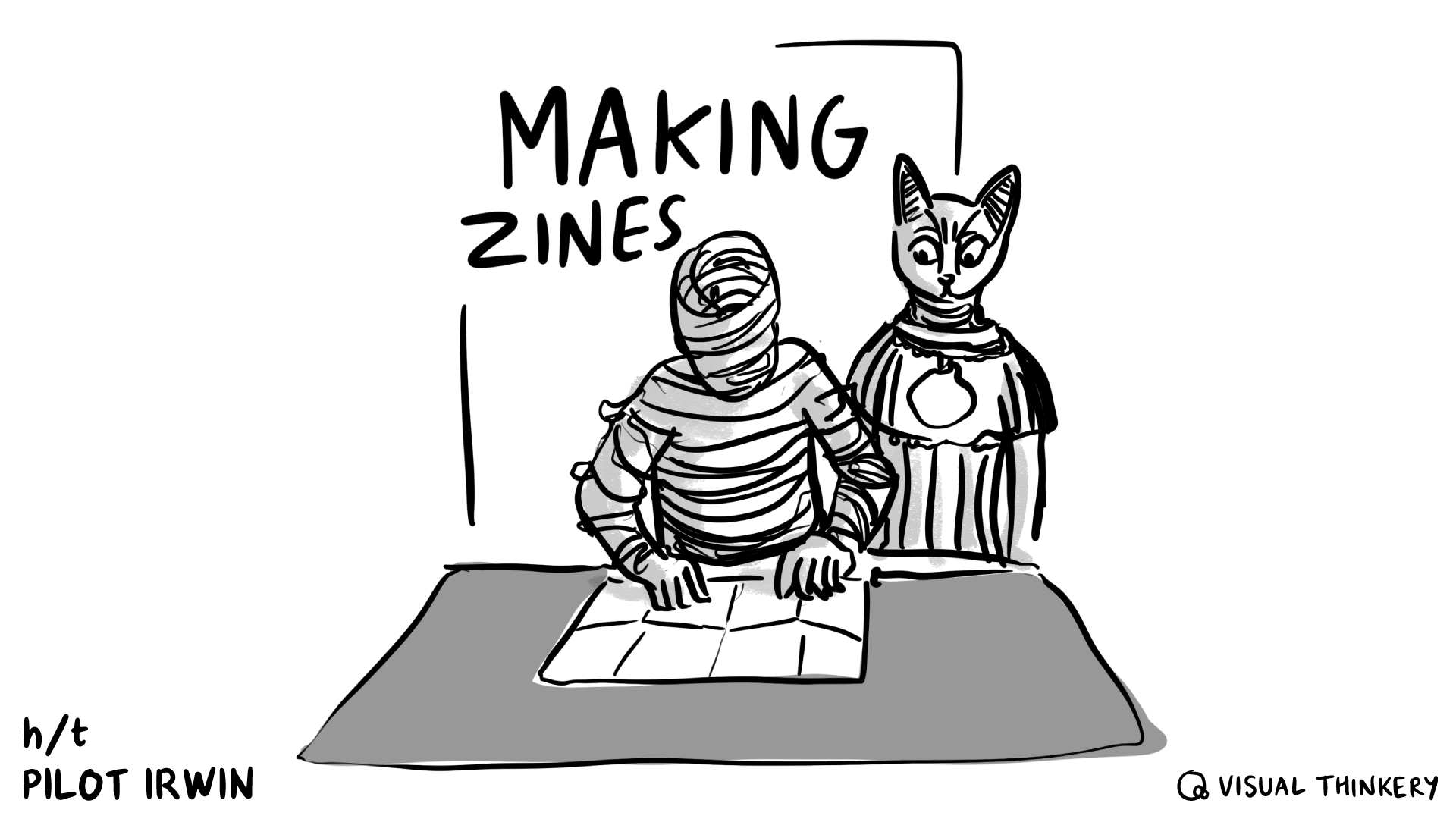
    After the blog-a-thon, Bryan Mathers also wrote up his reflections on it in “Blog-a-thon Sensemaking“, including some incredible artwork inspired by each post. (The one for mine looks amazing — thank you, Bryan!)
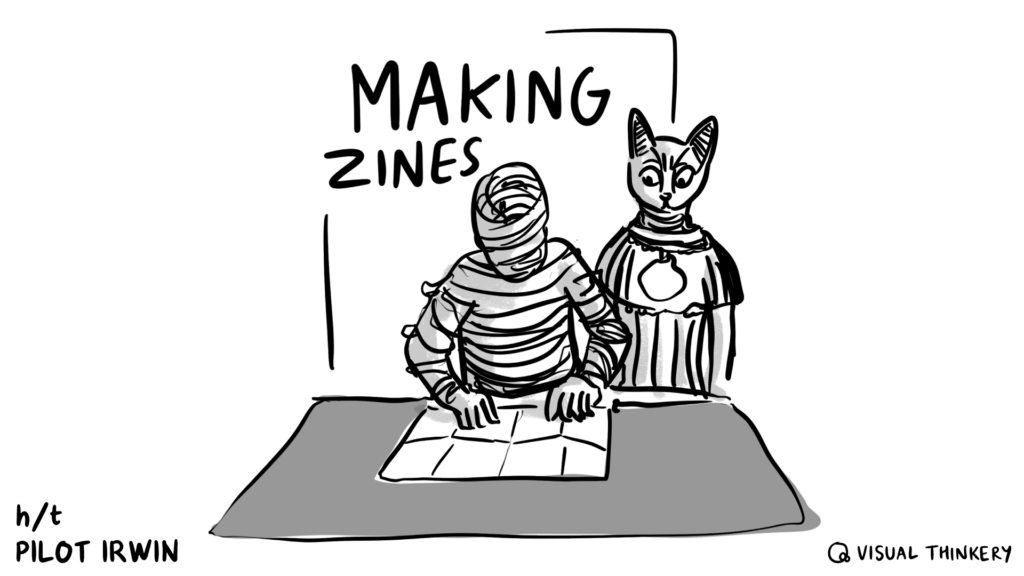
    An Ancient Egyptian cat watches a mummy fold a zine.

    Day 2

    More sessions (there were so many awesome ones) here! https://reclaimopen.com/category/day2/

    Day 3

    And day 3 was also full of tons of hits, so there’s more sessions here as well: https://reclaimopen.com/category/day3/

    In the coming days I’m hoping to try out more of the tools that people highlighted and catch up on the sessions I didn’t get to/the ones I couldn’t fully participate in because of work. In particular I want to check out Ian O’Bryne’s digital garden resources, explore 11ty more fully after Tim Klapdor’s introduction, and revisit the Docsify-This session. I’m also sorry to have missed a chunk of Mark Corbett Wilson’s digital storytelling session, so I’m definitely going to be revisiting that one.

    I also presented, too! I had a post in the blog-a-thon about the zine project I did (more on that here: Making Zines for Reclaim Open 2025) and I got to host a social session, playing the game Brand Actualization. I’ll write up Brand Actualization in a separate post, but we had a ton of fun. I got to host a different game for the DS106 Summer Camp in 2024 and I was hooked, so it was great to revisit that concept — I’d really like to do more sessions like those in the future when I get the chance.
  • Making Zines for Reclaim Open 2025

    When I was invited to be a part of Reclaim Open 2025, I decided I would use the opportunity as a challenge to do something I’d been mulling over for a long time: creating a zine.

    I tried my hand at zine making while I was at Reclaim, for a project that unfortunately had to be put on the backburner. Since then, I’ve been curious about revisiting it, and seeing what would be possible. I’ve had a couple of ideas bouncing around. This seemed like a good time to try.

    The challenge I set for myself was to make two open-source zines, print-ready, and blog about it in time for the conference. And, well, here’s the writeup!

    Results

    CTRL+S: Preserving Your Work for the Long Haul is a short primer on planning resilient digital projects and preserving and archiving them, so that when the time comes for them to be sunsetted, it’s easy for you to preserve their core attributes and archive them as best as possible.

    Web-Native Cryptids & Creatures: A Spotter’s Guide is a little trifold fun-facts style starter guide to various web safety and digital literacy topics, in the style of an Audubon birdwatcher’s pamphlet.

    Both of them are available as a for-print PDF and a more web-readable PDF (no need to download if you don’t want, you should be able to click through and view online). I’m not going to embed them here so that this post doesn’t become unreadably long.

    Process

    Before I started, I had the idea that I would actually try and make three zines. Then I sat down, tried to think of concepts, and blocked out a project plan for each zine. And then I changed my mind. Two would be plenty, actually.

    Of the concepts I picked, I went with one serious one and one fun one. CTRL+S is based on work I did at both Carleton College and Reclaim Hosting, on how to create and preserve resilient digital projects. Web Native Cryptids & Creatures is based on the fact that when I was little I had a trifold birdwatcher pamphlet that was basically the coolest thing ever.

    Naturally, the fun zine turned out to be a lot more stressful than the serious one.

    Planning

    The first thing I did was to decide on the structure. That would inform any outlining and writing, so even if I wasn’t actually doing layout right away, planning it still had to come first.

    I wanted each zine to fit on a double-sided sheet of printer paper. The cryptid zine was going to be a trifold “spotter’s guide” style thing, so it could have six pages (three front, three back). There was no particular style in mind for the preservation zine, so I decided to go with eight pages (four front, four back). I figured if I had to divide each topic onto its own page, sixteen was way too many and four might not be enough.

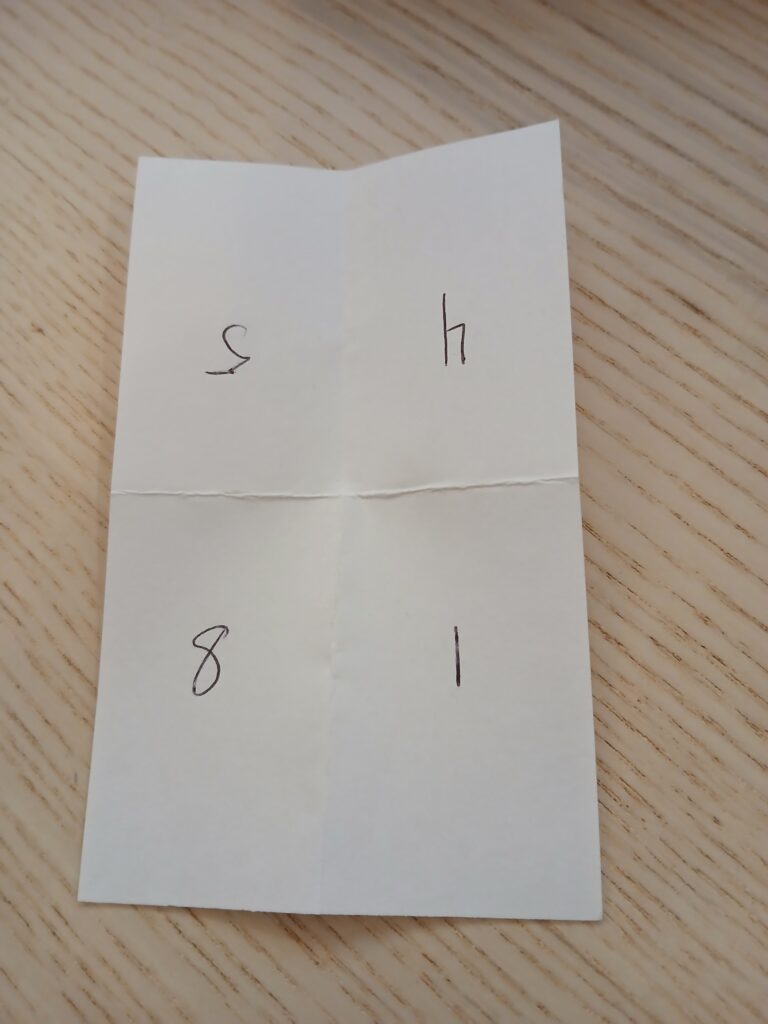
    The thing with laying stuff out for print is that stuff ends up in a weird order, upside-down, or both. I have several index cards that I folded and numbered in order to figure out what layout would end up having to look like.

    Photo of an index card that's been folded in half twice, to create four sections. In clockwise order, the numbers are 5, 4, 1, and 8. 5 and 4 are upside down.

    Drafting

    When in doubt, start with outlines.

    Since the preservation zine was based on work I’d already done, I reviewed the original handout, identified the two main topics, and made a list of other topics that I’d learned more about since then. There was nothing that strictly followed anything else, but I organized it into an order that seemed like it would flow well for people new to the topic, and then started making bullet points.

    The cryptid zine was meant to be a silly piece. I only needed five actual profiles, since one page would be for the title/credits, so I made a list of monster puns and then tried to narrow it down to the most plausible. But the actual writing was a balancing challenge: how do I make sure this is at least semi-useful… while also keeping it fun… and not too long… and also, what even is this strange thing called “humor”?

    It turns out that writing about topics you’ve presented on countless times is significantly simpler than trying to be funny on purpose. Go figure.

    Layout

    Layout was my shining star amidst the trenches of writing. I spent more time doing it than I expected, but that’s because it felt like such a breeze that I would look at the clock and be surprised by how quickly the time had passed.

    I had a genuinely great time playing with where the words would go, and how big, and what font, and what size margins. The slowest it ever got was when I spent an hour or two trying to manually set up a guideline grid that would match the cryptid zine’s trifold structure. Then I googled “affinity publisher column layout” and figured it out immediately.

    This also served as an extra editing pass. Moving the words into Affinity Publisher meant looking for ways to trim the bits that were too long, and rearrange anything that didn’t make sense.

    Illustration

    I checked my notes from while I was doing illustrating and all I found was screaming. The illustrations were all for the cryptid zine, and they were part of what was so stressful about it. I used to draw more, but I’m very rusty, and the first day I tried it was dispiriting. All my ideas seemed terrible, and nothing I drew looked at all like I wanted it to.

    I hit a point where I was just relieved that the preservation zine didn’t have space for illustrations, because the cryptid zine was freaking me out so much. It didn’t help that I hadn’t thought about the time I would need to draw, so it was getting very close to the deadline I had set for myself.

    In the end I took a step back. I came back the next day, did some extra warm ups, found more reference images, and went, “This is the fun zine. What matters is that illustrating it is also fun.” I could be silly with it, I told myself.

    And then I drew the Loch Ness Monster in sunglasses and a trenchcoat and had a great time.

    Reflections

    I’m glad I did this. For all my grumping, I had a great time with this project. Every time I hit a point of frustration, I would pause, take a break, come back, and almost immediately get in a groove. Giving myself two zines to switch between also helped a lot — when I was well and truly stuck on one, there was always something to do on the other, so I could just change gears.

    There’s a bunch of stuff I was hoping to have done in time for the conference that, in the end, I don’t. I wanted to put together web-page versions and get them archived on the WayBack Machine, and I’m going to do that. I wanted to try interviewing other zine makers and blog about those conversations, and I didn’t get to it. But the goal for the conference was to have two print-ready PDFs, and I did manage that.

    So if you’re thinking about making a zine, let this be your sign!

    And these zines are openly-licensed, so if they’re helpful to you, please go ahead and use them! I’d love to hear about it if you do.

  • Answering the Challenge

    Maren challenged me to take part in a sort of blogging chain mail challenge, answering questions about my blogging process and my history with the blog.

    I don’t post on here very often (my most recent post is from nearly a year ago, yikes!) but answering some questions seemed like a simple and quick way to get back in the blogging rhythm.

    Tagging Taylor to keep it going!

    Why did you start blogging in the first place?

    I would say I originally started blogging “for real” when I was a Digital Scholarship intern at Carleton. We had a blog for all the DS interns to share their work — hosted on DoOO, actually! — and one of my job responsibilities was that once a week, I would research a recent digital ethics question or topic, and write a short post summing it up for the library (with citations of course).

    I really liked it because it felt like a way both to learn and to put my thoughts together. And because it was a regular responsibility, it meant I wasn’t too precious with it — doing the research and getting the post out was the main thing.

    What platform are you using to manage your blog, and why do you use it?

    I use WordPress to manage my blog, mostly because that’s what the DS intern blog used, and so it’s what I’m used to. It was really convenient to be able to take an export of all my research posts and then import them directly into this blog (though I did have to do a bunch of tag cleanup…)

    Have you blogged on other platforms before?

    Sometimes! When I was younger (a lot younger, so much so that I wouldn’t even know where to find this stuff anymore), I played around on Blogspot for about a week and then got bored. More recently, I’ve used Ghost as part of my work for Reclaim, since we use that for our monthly newsletter and our breaking news announcements blog.

    How do you write your posts?

    Usually I’ll skeleton out my thoughts as an outline, adding in notes and thoughts as I have them. Once I feel like I’m done with that, I’ll go back and either write start-to-finish or grab a section where I had a lot of notes and thoughts and write that. There’s a lot of jumping around in my process, so even when I do draft a post, a lot of times it never gets finished.

    In terms of where I draft, I do that in WordPress. For a while I was writing in Obsidian or GDocs or whatever other word processor was my choice at the time, but copy-pasting into WP was a huge headache. I don’t really like how the FSE means that the word processor looks like my blog theme, though — I find it distracting. Though that’s probably a sign that I should change my blog style, TBH.

    When do you feel most inspired to write?

    Usually towards the end of the day, when I can get my thoughts in order.

    Do you normally publish immediately after writing, or do you let it simmer a bit?

    I might let it simmer for maybe fifteen minutes. Anything more than that and it’s up and gone. I spend enough time noodling around in the drafting phase that I don’t need a post to sit for any longer than necessary.

    What’s your favorite post on your blog?

    I wouldn’t say I have any particular favorite posts, but I picked a couple of ones that popped into my head fondly for one reason or another:

    • Working from Home? Hardly Working – This is one of the research posts I wrote for Carleton, back during Spring of 2020 when school had just gone remote. It’s a collection of work-from-home resources, and I had a lot of fun researching them and hoping that people would find them useful.
    • The Finger-painting Approach – This blog post was me reflecting on building a very crappy HTML/CSS site, giving myself permission to make something that was not only unpolished but actively bad. It’s something I wish I felt comfortable doing more often.
    • The Persistence Project: What It Was, How It Went – A short summary of one of the projects I worked on as a DS intern, putting together resources to help the library get people to think more deeply about the longterm life of their digital projects. I credit that project with a lot of how I think about archival and preservation today.
    • Monster of the Week in 2022 & 2023 – This post turned two a week or so ago. I’m including it on here mostly because I very rarely let myself do non-work blogging on here, so it’s fun to look back at a post that’s purely hobby.

    Any future plans for the blog?

    The more I look at it, the more I feel like I should probably change my blog theme. So that first, and then we’ll see. Maybe a new theme will get me more hyped to write.

  • Drafting a Scope of Work

    This past week I had cause to make a scope of work for a client from scratch, which is something I don’t get to do very often. I figured I could blog the process just to document it, though I’m not going to share any examples from the actual SOW I made — just outlines.

    I actually had a scope of work that I’d made back in 2022 (!) available in Google Drive, which I only remembered existed by coincidence. But it was a nice find, because it meant that I could reuse all of the formatting work I’d done previously, even if all the content had to be jettisoned. I could also build off the structure of the old one/scrap or add parts as needed.

    The overall structure was:

    • Title
    • Contextual information
      • the client’s institution
      • the name & title of the person I’m preparing it for
      • my name & title
      • the date
    • Overview (context section that goes sort of broadest to narrowest on detail – the name of the product/service and what the client’s needs are, then info on the product/service and how it will meet those needs)
    • Work Breakdown (specific steps that will happen in order to provide the product/service – both what we’re responsible for & what the client will need to do)
      • If I need to give a specific explanation of why a step has to happen a certain way, I’ll do it here, but I try to keep it short
      • Mode of delivery, if there’s specific deliverables
      • Hours required for a service, if a certain step needs it
      • This bit got split into multiple sections for the SOW I made, because there were multiple things the client wanted & each one had different things that needed to happen
    • Costs Breakdown (a table of costs with the following columns):
      • Unit type
      • # of units
      • Item/description
      • Unit price
      • Total item price

    In other SOWs I could probably include a specific work timeline or relevant history between Reclaim and the client, or other information if it’s needed, but it wasn’t for this.

    The other important thing was a sanity check. I ran this by Taylor, Amanda and Jim, and they noticed some big changes that needed making (Taylor in particular found a point where I was seriously overcomplicating things!)

    I found the process pretty fun! Drafting this kind of thing from scratch doesn’t come up all that much, but somehow it feels like helping to create something totally new, which is just plain cool.

  • Mapping DoOO’s Systems

    So there’s two reasons for this post. The first is that I was going through my list of those miscellaneous ideas that you can do at some point in the future that would be fun or helpful (hopefully) but that you never quite get around to, and I saw something on there that seemed like it would be quick and maybe hopefully useful to someone.

    The second one is that, by the deadlines that I personally have set, today is the last day to publish a blog post that will make it into the June newsletter and if I put something out then I will have two blog posts in a newsletter for the first time since October 2022 (I need to blog more).

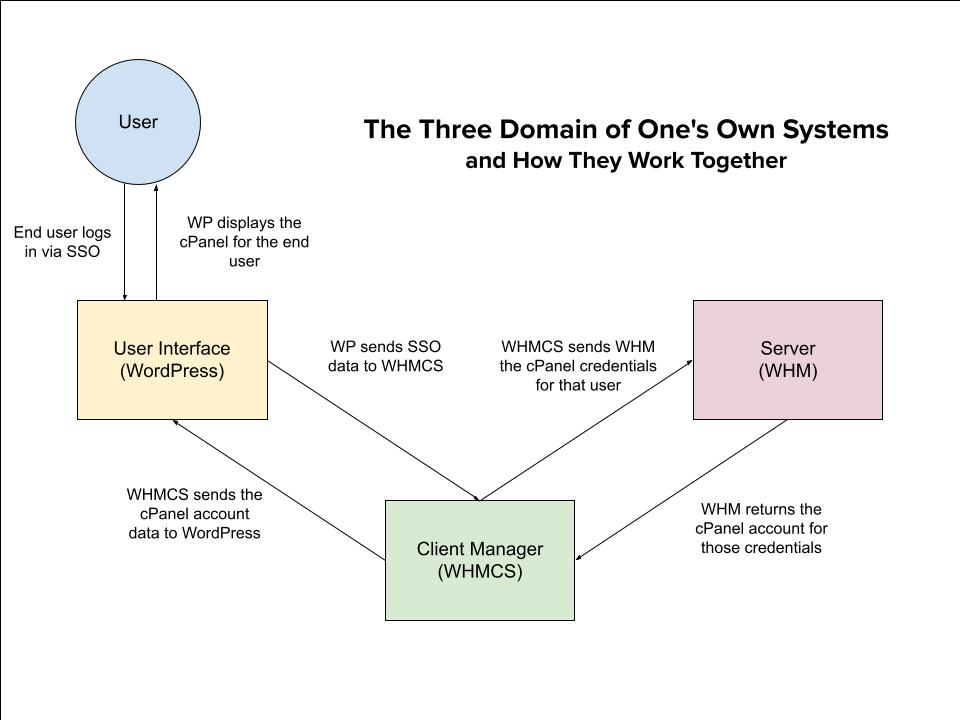
    Anyway, I was going through my to-do list and in the section of “miscellaneous ideas for the future” I saw something about making a diagram of how the three systems of Domain of One’s Own work together. It’s something I have to explain a lot when training new admins, and while I feel like I’ve got a pretty good handle on the overarching metaphor by now, training usually focuses on each system’s user interface and what admins can do with that system, so I always worry I’ve skimped on making sure they’ve got the full picture.

    To that end, I made a diagram.

    This was very much something I saw on the list and went “Hey, I could do a pretty version of that in the future given a couple of days and some dedicated resources, or I could do a functional version of that right now using Google Drive’s weird photomanipulation-ish drawing platform.” And functional now is better than pretty later.

    So, voila: The Diagram.

    A diagram indicating a user, the user interface WordPress, the Client Manager WHMCS, and the server WHM. The diagram shows how an end user logging into the interface with SSO, has that information passed to WHMCS in order to retrieve data from the server and display it for the user in the interface.

    Hope I didn’t hype it up too much.

    Is this accurate? That’s gonna be a strong “if you want the zoomed out version, sure.” But it’s close enough for our purposes, it only took about twenty minutes, and I got this blog post done in time for the Roundup deadline, so I’m going to call this a win.

    It’s definitely not perfect. Looking at it now I’m thinking of all the little adjustments that I want to make, both in the text and in the design. But like I said back in October, sometimes you have to let perfection go.

    Also, it’s here as a PDF too I guess, since Google Draw also offers that as an export format.

    UPDATE FROM JANUARY 2024: I made a newer version updated for slightly better readability, so that’s here now also.

css.php