Author: CapnPilot

  • The Power of Games in Virtual Events

    I recently got to do something really cool: be a guest on a podcast! Maren Deepwell and I have worked together for several years in various capacities, including on a couple of virtual conferences, most recently Reclaim Open 2025 back in November. I was part of the blog-a-thon, but I also hosted a session, and Maren invited me onto her show, “Leading Virtual Teams with Dr Maren Deepwell” to talk about it!

    You should listen to the episode for the full details (it’s coming out soon, and I’ll update this post with a link when it does), but the general gist is that I ran the role-playing game Brand Actualization as a one-hour community event. I had a ton of fun and people’s responses were wonderful. This wasn’t the first time I’ve hosted a role-playing game for a conference, either. I ran Long Time Listener, Last Time Caller for the DS106 Radio Summer Camp in 2024, which was also a big success.

    I run games for conferences because I want to give people a chance to let down their hair. Conferences are great, but they also create pressure. Everyone attending needs to be on, to stay collected and professional and locked in for two or three or four days in a row. In the middle of all of that, my games are like Halloween: everyone can put on a costume and play pretend for a little while. If I can give them an hour to relax and bond and have a little fun, I consider that a win.

    The virtual format was an interesting challenge. Playing games in person makes it easy to engage with players and get a sense of how they’re doing, but online, people can mute themselves and go camera-off. I think that can be useful, because people often feel shy at first, and letting them lurk can help them relax enough to start engaging as the session goes on.

    Accepting that people will want to take part at different levels is also important for creating buy-in. Trying to force one person to do more than they’re comfortable with shows everyone they might be put on the spot at any moment, which makes all the pressure rush back in.

    At the same time, you don’t have a game if no one will play. The chat and online polling tools ended up being really helpful low-stakes tools to start people talking, and the platform’s name customization tools meant I could respond to people individually in-character. That was important to me, since the game was supposed to be a conversation. Staying in-character and addressing players directly settled them into the game while acknowledging and encouraging their contributions.

    To me, these games give people the chance to open up. Conferences are a time to meet people, but it’s easy to stress out over how you come off, or whether people will remember you the wrong way. But when everyone has chosen to spend an hour playing pretend as a group, when everyone feels comfortable getting a little silly together, you get a level of fun and trust that results in unforgettable connections.

    Maren and I go into more depth on all of this in the episode, so be sure to check it out next week. And honestly, there’s even more I could say, but that’s probably for future blog posts.

    The response to these games has been amazing, way beyond what I expected. When I caught up with some people from Reclaim Open in December, they mentioned my session as a highlight. A couple of people have even asked whether I would host games for other events in the future — not just other conferences, but team-building activities or professional development workshops.

    And I’m excited to say… YES! I’m collaborating with Taylor Jadin, another longtime friend and colleague, create Fireside Game Events and offer more of these bespoke game sessions. More formal details on this soon, but if you’re interested in having us at one of your events in the meantime, get in touch.

  • Thoughts on Reclaim Open 2025

    Thoughts on Reclaim Open 2025

    It’s taken me a minute, but I wanted to sit down and write about Reclaim Open last week. It was a great conference, and since blogging was one of the key topics, I figured a blog post would be the best way to cap it off.

    The whole experience was really fantastic, but I’ll start with the format. Since the whole thing was online, Tuesday was a blog-a-thon, where each presenter submitted a blog post, and those posts were published each hour on the hour. There was a live chat, where people could comment and talk about the post once they’d read through. I liked this a lot — it was a good way to get familiar with the site interface and the names in the chat, and it was also good as a way of doing discussion sessions without requiring everyone to spend all day on camera.

    Wednesday and Thursday were more classic, with streamed video sessions and a livechat where attendees could comment or ask questions. Since Tuesday had acted as a warm-up, it was really natural to get into things and there was no first-day awkwardness.

    I was also working during the conference, so I couldn’t be as present during all the sessions as I would have liked. But even the ones I only caught part of were excellent. Just to shout out a couple:

    Day 1: The Blog-a-Thon

    And for more great work, you can actually check out the full list of posts for the Blog-a-thon here: https://reclaimopen.com/category/day1/

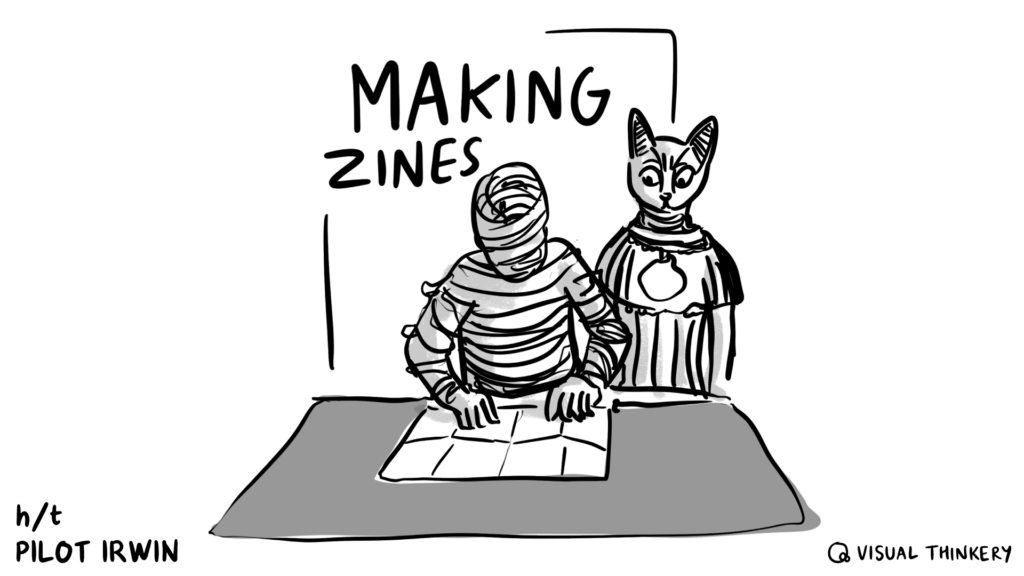
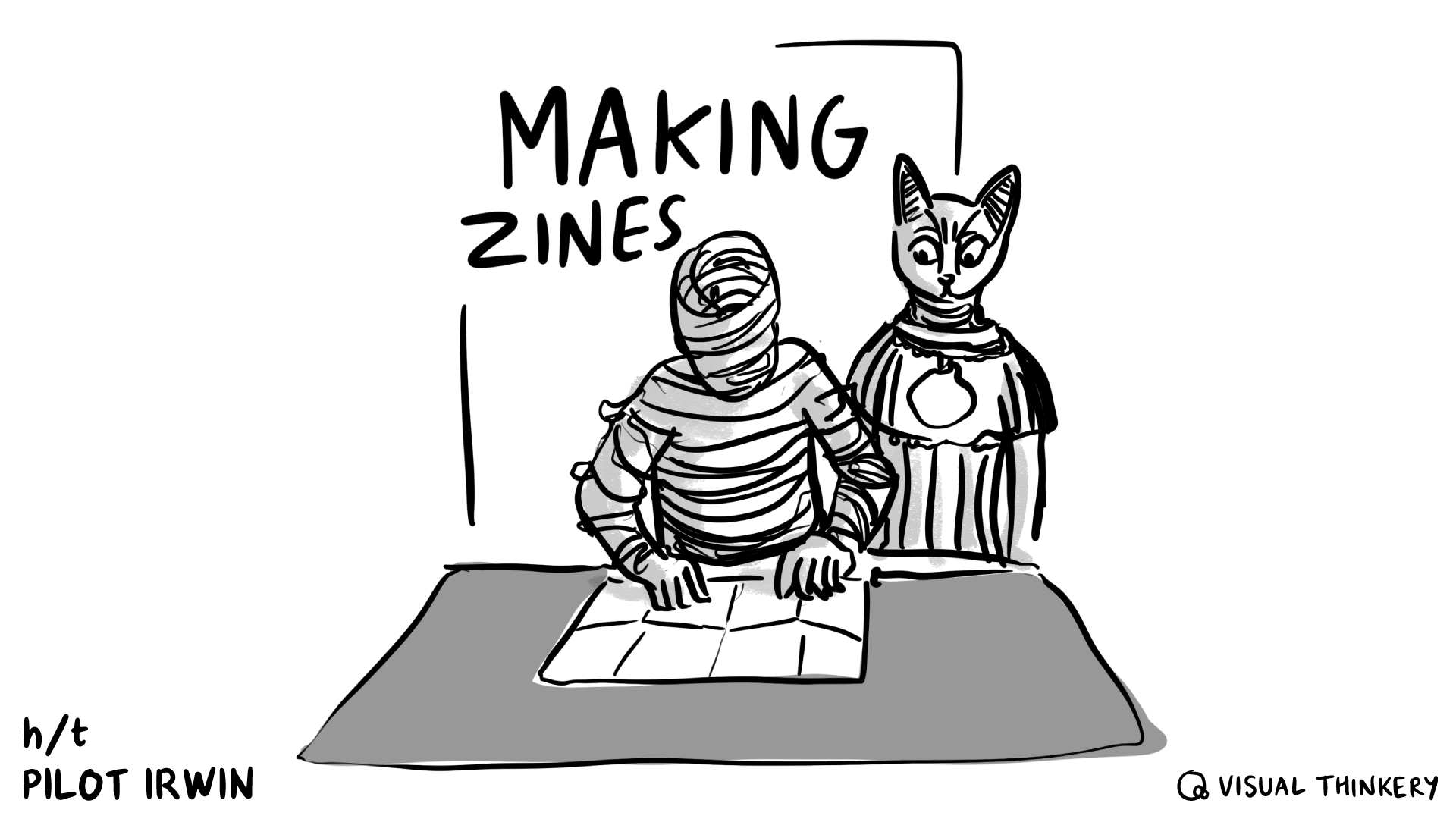
    After the blog-a-thon, Bryan Mathers also wrote up his reflections on it in “Blog-a-thon Sensemaking“, including some incredible artwork inspired by each post. (The one for mine looks amazing — thank you, Bryan!)

    An Ancient Egyptian cat watches a mummy fold a zine.

    Day 2

    More sessions (there were so many awesome ones) here! https://reclaimopen.com/category/day2/

    Day 3

    And day 3 was also full of tons of hits, so there’s more sessions here as well: https://reclaimopen.com/category/day3/

    In the coming days I’m hoping to try out more of the tools that people highlighted and catch up on the sessions I didn’t get to/the ones I couldn’t fully participate in because of work. In particular I want to check out Ian O’Bryne’s digital garden resources, explore 11ty more fully after Tim Klapdor’s introduction, and revisit the Docsify-This session. I’m also sorry to have missed a chunk of Mark Corbett Wilson’s digital storytelling session, so I’m definitely going to be revisiting that one.

    I also presented, too! I had a post in the blog-a-thon about the zine project I did (more on that here: Making Zines for Reclaim Open 2025) and I got to host a social session, playing the game Brand Actualization. I’ll write up Brand Actualization in a separate post, but we had a ton of fun. I got to host a different game for the DS106 Summer Camp in 2024 and I was hooked, so it was great to revisit that concept — I’d really like to do more sessions like those in the future when I get the chance.

  • Making Zines for Reclaim Open 2025

    When I was invited to be a part of Reclaim Open 2025, I decided I would use the opportunity as a challenge to do something I’d been mulling over for a long time: creating a zine.

    I tried my hand at zine making while I was at Reclaim, for a project that unfortunately had to be put on the backburner. Since then, I’ve been curious about revisiting it, and seeing what would be possible. I’ve had a couple of ideas bouncing around. This seemed like a good time to try.

    The challenge I set for myself was to make two open-source zines, print-ready, and blog about it in time for the conference. And, well, here’s the writeup!

    Results

    CTRL+S: Preserving Your Work for the Long Haul is a short primer on planning resilient digital projects and preserving and archiving them, so that when the time comes for them to be sunsetted, it’s easy for you to preserve their core attributes and archive them as best as possible.

    Web-Native Cryptids & Creatures: A Spotter’s Guide is a little trifold fun-facts style starter guide to various web safety and digital literacy topics, in the style of an Audubon birdwatcher’s pamphlet.

    Both of them are available as a for-print PDF and a more web-readable PDF (no need to download if you don’t want, you should be able to click through and view online). I’m not going to embed them here so that this post doesn’t become unreadably long.

    Process

    Before I started, I had the idea that I would actually try and make three zines. Then I sat down, tried to think of concepts, and blocked out a project plan for each zine. And then I changed my mind. Two would be plenty, actually.

    Of the concepts I picked, I went with one serious one and one fun one. CTRL+S is based on work I did at both Carleton College and Reclaim Hosting, on how to create and preserve resilient digital projects. Web Native Cryptids & Creatures is based on the fact that when I was little I had a trifold birdwatcher pamphlet that was basically the coolest thing ever.

    Naturally, the fun zine turned out to be a lot more stressful than the serious one.

    Planning

    The first thing I did was to decide on the structure. That would inform any outlining and writing, so even if I wasn’t actually doing layout right away, planning it still had to come first.

    I wanted each zine to fit on a double-sided sheet of printer paper. The cryptid zine was going to be a trifold “spotter’s guide” style thing, so it could have six pages (three front, three back). There was no particular style in mind for the preservation zine, so I decided to go with eight pages (four front, four back). I figured if I had to divide each topic onto its own page, sixteen was way too many and four might not be enough.

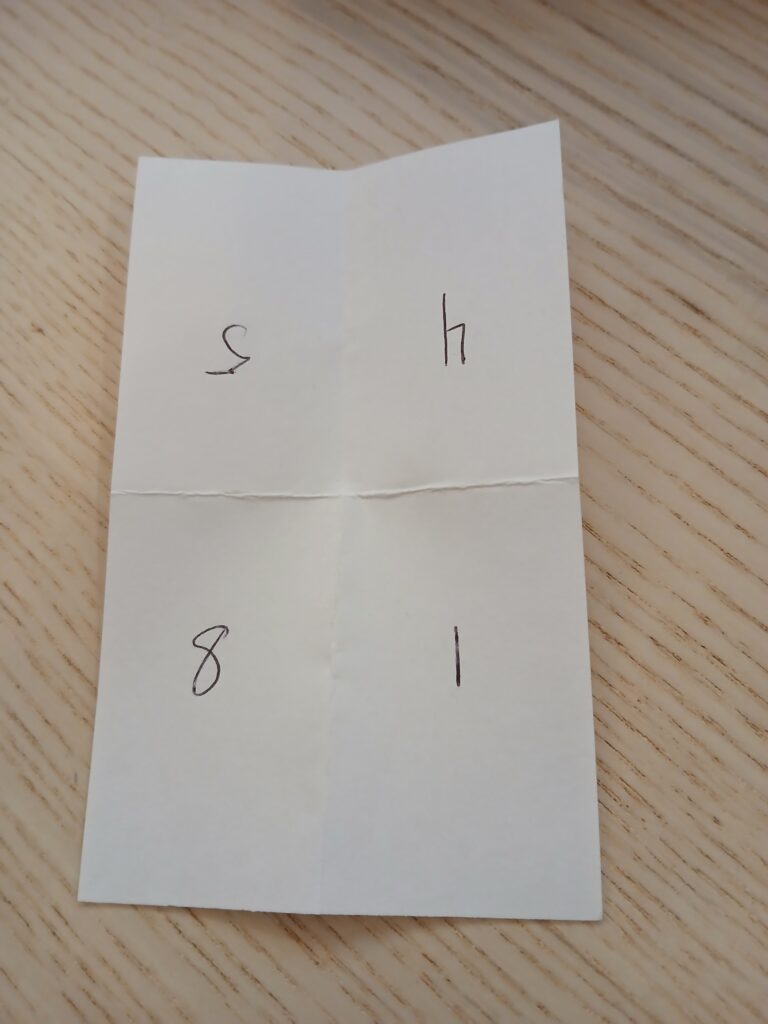
    The thing with laying stuff out for print is that stuff ends up in a weird order, upside-down, or both. I have several index cards that I folded and numbered in order to figure out what layout would end up having to look like.

    Photo of an index card that's been folded in half twice, to create four sections. In clockwise order, the numbers are 5, 4, 1, and 8. 5 and 4 are upside down.

    Drafting

    When in doubt, start with outlines.

    Since the preservation zine was based on work I’d already done, I reviewed the original handout, identified the two main topics, and made a list of other topics that I’d learned more about since then. There was nothing that strictly followed anything else, but I organized it into an order that seemed like it would flow well for people new to the topic, and then started making bullet points.

    The cryptid zine was meant to be a silly piece. I only needed five actual profiles, since one page would be for the title/credits, so I made a list of monster puns and then tried to narrow it down to the most plausible. But the actual writing was a balancing challenge: how do I make sure this is at least semi-useful… while also keeping it fun… and not too long… and also, what even is this strange thing called “humor”?

    It turns out that writing about topics you’ve presented on countless times is significantly simpler than trying to be funny on purpose. Go figure.

    Layout

    Layout was my shining star amidst the trenches of writing. I spent more time doing it than I expected, but that’s because it felt like such a breeze that I would look at the clock and be surprised by how quickly the time had passed.

    I had a genuinely great time playing with where the words would go, and how big, and what font, and what size margins. The slowest it ever got was when I spent an hour or two trying to manually set up a guideline grid that would match the cryptid zine’s trifold structure. Then I googled “affinity publisher column layout” and figured it out immediately.

    This also served as an extra editing pass. Moving the words into Affinity Publisher meant looking for ways to trim the bits that were too long, and rearrange anything that didn’t make sense.

    Illustration

    I checked my notes from while I was doing illustrating and all I found was screaming. The illustrations were all for the cryptid zine, and they were part of what was so stressful about it. I used to draw more, but I’m very rusty, and the first day I tried it was dispiriting. All my ideas seemed terrible, and nothing I drew looked at all like I wanted it to.

    I hit a point where I was just relieved that the preservation zine didn’t have space for illustrations, because the cryptid zine was freaking me out so much. It didn’t help that I hadn’t thought about the time I would need to draw, so it was getting very close to the deadline I had set for myself.

    In the end I took a step back. I came back the next day, did some extra warm ups, found more reference images, and went, “This is the fun zine. What matters is that illustrating it is also fun.” I could be silly with it, I told myself.

    And then I drew the Loch Ness Monster in sunglasses and a trenchcoat and had a great time.

    Reflections

    I’m glad I did this. For all my grumping, I had a great time with this project. Every time I hit a point of frustration, I would pause, take a break, come back, and almost immediately get in a groove. Giving myself two zines to switch between also helped a lot — when I was well and truly stuck on one, there was always something to do on the other, so I could just change gears.

    There’s a bunch of stuff I was hoping to have done in time for the conference that, in the end, I don’t. I wanted to put together web-page versions and get them archived on the WayBack Machine, and I’m going to do that. I wanted to try interviewing other zine makers and blog about those conversations, and I didn’t get to it. But the goal for the conference was to have two print-ready PDFs, and I did manage that.

    So if you’re thinking about making a zine, let this be your sign!

    And these zines are openly-licensed, so if they’re helpful to you, please go ahead and use them! I’d love to hear about it if you do.

  • Answering the Challenge

    Maren challenged me to take part in a sort of blogging chain mail challenge, answering questions about my blogging process and my history with the blog.

    I don’t post on here very often (my most recent post is from nearly a year ago, yikes!) but answering some questions seemed like a simple and quick way to get back in the blogging rhythm.

    Tagging Taylor to keep it going!

    Why did you start blogging in the first place?

    I would say I originally started blogging “for real” when I was a Digital Scholarship intern at Carleton. We had a blog for all the DS interns to share their work — hosted on DoOO, actually! — and one of my job responsibilities was that once a week, I would research a recent digital ethics question or topic, and write a short post summing it up for the library (with citations of course).

    I really liked it because it felt like a way both to learn and to put my thoughts together. And because it was a regular responsibility, it meant I wasn’t too precious with it — doing the research and getting the post out was the main thing.

    What platform are you using to manage your blog, and why do you use it?

    I use WordPress to manage my blog, mostly because that’s what the DS intern blog used, and so it’s what I’m used to. It was really convenient to be able to take an export of all my research posts and then import them directly into this blog (though I did have to do a bunch of tag cleanup…)

    Have you blogged on other platforms before?

    Sometimes! When I was younger (a lot younger, so much so that I wouldn’t even know where to find this stuff anymore), I played around on Blogspot for about a week and then got bored. More recently, I’ve used Ghost as part of my work for Reclaim, since we use that for our monthly newsletter and our breaking news announcements blog.

    How do you write your posts?

    Usually I’ll skeleton out my thoughts as an outline, adding in notes and thoughts as I have them. Once I feel like I’m done with that, I’ll go back and either write start-to-finish or grab a section where I had a lot of notes and thoughts and write that. There’s a lot of jumping around in my process, so even when I do draft a post, a lot of times it never gets finished.

    In terms of where I draft, I do that in WordPress. For a while I was writing in Obsidian or GDocs or whatever other word processor was my choice at the time, but copy-pasting into WP was a huge headache. I don’t really like how the FSE means that the word processor looks like my blog theme, though — I find it distracting. Though that’s probably a sign that I should change my blog style, TBH.

    When do you feel most inspired to write?

    Usually towards the end of the day, when I can get my thoughts in order.

    Do you normally publish immediately after writing, or do you let it simmer a bit?

    I might let it simmer for maybe fifteen minutes. Anything more than that and it’s up and gone. I spend enough time noodling around in the drafting phase that I don’t need a post to sit for any longer than necessary.

    What’s your favorite post on your blog?

    I wouldn’t say I have any particular favorite posts, but I picked a couple of ones that popped into my head fondly for one reason or another:

    • Working from Home? Hardly Working – This is one of the research posts I wrote for Carleton, back during Spring of 2020 when school had just gone remote. It’s a collection of work-from-home resources, and I had a lot of fun researching them and hoping that people would find them useful.
    • The Finger-painting Approach – This blog post was me reflecting on building a very crappy HTML/CSS site, giving myself permission to make something that was not only unpolished but actively bad. It’s something I wish I felt comfortable doing more often.
    • The Persistence Project: What It Was, How It Went – A short summary of one of the projects I worked on as a DS intern, putting together resources to help the library get people to think more deeply about the longterm life of their digital projects. I credit that project with a lot of how I think about archival and preservation today.
    • Monster of the Week in 2022 & 2023 – This post turned two a week or so ago. I’m including it on here mostly because I very rarely let myself do non-work blogging on here, so it’s fun to look back at a post that’s purely hobby.

    Any future plans for the blog?

    The more I look at it, the more I feel like I should probably change my blog theme. So that first, and then we’ll see. Maybe a new theme will get me more hyped to write.

  • Drafting a Scope of Work

    This past week I had cause to make a scope of work for a client from scratch, which is something I don’t get to do very often. I figured I could blog the process just to document it, though I’m not going to share any examples from the actual SOW I made — just outlines.

    I actually had a scope of work that I’d made back in 2022 (!) available in Google Drive, which I only remembered existed by coincidence. But it was a nice find, because it meant that I could reuse all of the formatting work I’d done previously, even if all the content had to be jettisoned. I could also build off the structure of the old one/scrap or add parts as needed.

    The overall structure was:

    • Title
    • Contextual information
      • the client’s institution
      • the name & title of the person I’m preparing it for
      • my name & title
      • the date
    • Overview (context section that goes sort of broadest to narrowest on detail – the name of the product/service and what the client’s needs are, then info on the product/service and how it will meet those needs)
    • Work Breakdown (specific steps that will happen in order to provide the product/service – both what we’re responsible for & what the client will need to do)
      • If I need to give a specific explanation of why a step has to happen a certain way, I’ll do it here, but I try to keep it short
      • Mode of delivery, if there’s specific deliverables
      • Hours required for a service, if a certain step needs it
      • This bit got split into multiple sections for the SOW I made, because there were multiple things the client wanted & each one had different things that needed to happen
    • Costs Breakdown (a table of costs with the following columns):
      • Unit type
      • # of units
      • Item/description
      • Unit price
      • Total item price

    In other SOWs I could probably include a specific work timeline or relevant history between Reclaim and the client, or other information if it’s needed, but it wasn’t for this.

    The other important thing was a sanity check. I ran this by Taylor, Amanda and Jim, and they noticed some big changes that needed making (Taylor in particular found a point where I was seriously overcomplicating things!)

    I found the process pretty fun! Drafting this kind of thing from scratch doesn’t come up all that much, but somehow it feels like helping to create something totally new, which is just plain cool.

  • What I’m Learning from Learning French

    So there are people way more equipped than me to talk about How To Support Learning. But following up on my post from a couple weeks ago about what makes self-directed online learning difficult, I wanted to think about how to ease some of the issues I was talking about.

    The two things that came to mind are defining the why and finding community.

    I know I can’t shut up about Duolingo, but it’s the thing I’ve had the most success with, so I’m gonna keep chattering about it. I mentioned in my last post that I was getting frustrated with Italian, feeling kind of stagnant — my grammar wasn’t great and neither was my vocabulary. There weren’t exercises available to me for composition/writing/speaking, only for comprehension/reading/listening.

    So in the past two weeks or so, I’ve switched to French.

    And it’s really working! I’m doing more lessons in a day, making noticeable progress through the Rookie section of the course (the overall course is more than two hundred units, yeesh — I’ve finished about 2.5). I’m not in anything advanced yet, starting from total basics, but I’m feeling more motivated than I have in a while.

    Why?

    Well, the first part is probably just plain old novelty. Switching things up reinvigorates me, and I can get excited about something new because it’s easy to feel like I’m making progress when I’m still in the beginner phases, before I reach the frustration plateau of “not complex enough to feel like I’m really achieving anything but still complex enough that I don’t really get it”.

    But parts two and three — the why and the who — are the reason I picked French, and the reason I’m excited. And they’re sort of the same reason.

    I didn’t actually pick up Italian to talk to people. Of the few people I know who understand Italian, there’s not really anyone in my life who I would regularly use it with, either because they’re not particularly practiced either or because I see them very infrequently. So I didn’t pick up Italian because of community, but because a character I was playing in my Shadowrun TTRPG speaks Italian, and I thought it would be neat to try. Which isn’t the worst reason in the world, but it wasn’t as if I was going to use Italian in the game, just that I was going to learn it in addition for fun. No further purpose.

    But unlike Italian, I have several friends whom I talk to regularly and who also speak fluent French. I can speak French around the house, and get feedback on my pronunciation and grammar. Like I said, I’m still in the little leagues, so my vocabulary is limited, but “Are you eating? I’m eating with you,” and “Look! A dog!” feel like they’re pretty applicable to everyday life nonetheless.

    Having a community of people who you can use your skills with, to have fun with them and get excited about stuff, to learn from and to learn with, is a huge boon to learning. Understanding your own goals helps you stay motivated and remember why you’re doing it. And if those two things can overlap, so much the better. In any case–

    Au revoir, arrivederci, and see you next time.

  • Mapping DoOO’s Systems

    So there’s two reasons for this post. The first is that I was going through my list of those miscellaneous ideas that you can do at some point in the future that would be fun or helpful (hopefully) but that you never quite get around to, and I saw something on there that seemed like it would be quick and maybe hopefully useful to someone.

    The second one is that, by the deadlines that I personally have set, today is the last day to publish a blog post that will make it into the June newsletter and if I put something out then I will have two blog posts in a newsletter for the first time since October 2022 (I need to blog more).

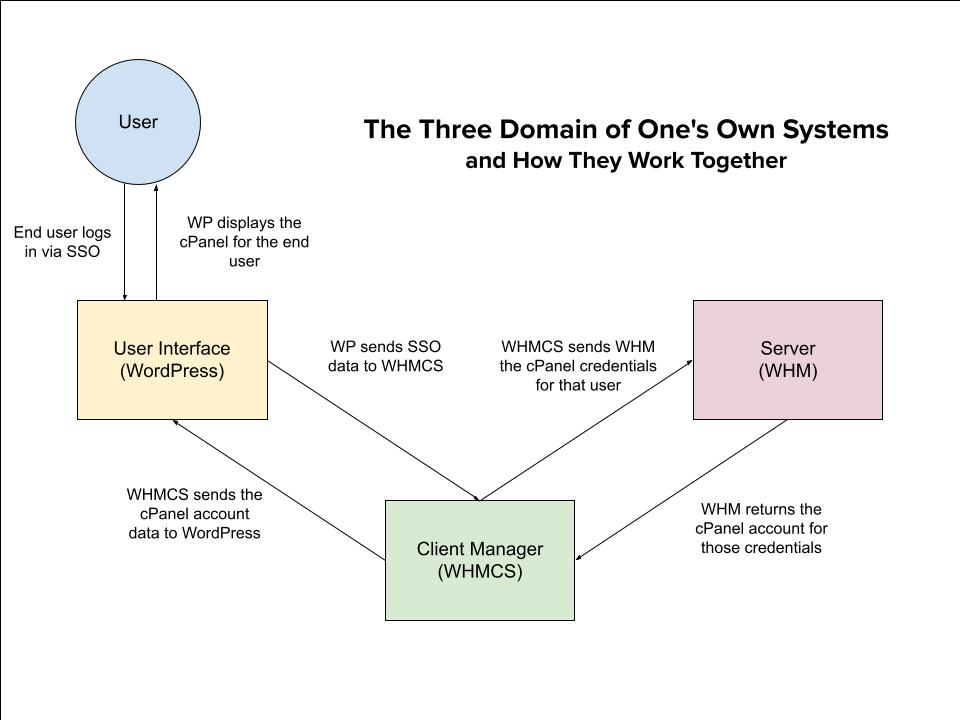
    Anyway, I was going through my to-do list and in the section of “miscellaneous ideas for the future” I saw something about making a diagram of how the three systems of Domain of One’s Own work together. It’s something I have to explain a lot when training new admins, and while I feel like I’ve got a pretty good handle on the overarching metaphor by now, training usually focuses on each system’s user interface and what admins can do with that system, so I always worry I’ve skimped on making sure they’ve got the full picture.

    To that end, I made a diagram.

    This was very much something I saw on the list and went “Hey, I could do a pretty version of that in the future given a couple of days and some dedicated resources, or I could do a functional version of that right now using Google Drive’s weird photomanipulation-ish drawing platform.” And functional now is better than pretty later.

    So, voila: The Diagram.

    A diagram indicating a user, the user interface WordPress, the Client Manager WHMCS, and the server WHM. The diagram shows how an end user logging into the interface with SSO, has that information passed to WHMCS in order to retrieve data from the server and display it for the user in the interface.

    Hope I didn’t hype it up too much.

    Is this accurate? That’s gonna be a strong “if you want the zoomed out version, sure.” But it’s close enough for our purposes, it only took about twenty minutes, and I got this blog post done in time for the Roundup deadline, so I’m going to call this a win.

    It’s definitely not perfect. Looking at it now I’m thinking of all the little adjustments that I want to make, both in the text and in the design. But like I said back in October, sometimes you have to let perfection go.

    Also, it’s here as a PDF too I guess, since Google Draw also offers that as an export format.

    UPDATE FROM JANUARY 2024: I made a newer version updated for slightly better readability, so that’s here now also.

  • Learning to Learn; or, Online Barriers for Total Beginners

    Coming off of Reclaim Open, one of the things I’m thinking about is online resources for self-teaching beginners. When we were interviewing people for the documentary, we asked people what they were glad the internet had now, in the present, that it hadn’t had in the past. And a lot of people — not everyone, but a lot — talked about how there’s a plethora of learning resources for beginners on just about any subject. Which got me thinking about the learning resources that I’ve used and the tutorials I’ve tried to follow.

    There are so many things that I want to learn. I’ve got a post in the works about teaching myself to draw. About a month ago, I hit a milestone on my Duolingo streak (800 days!). I used to practice guitar, though I’ve fallen out of that habit in the past year. For a while I was experimenting with some of the beginner guides to Unity. I have an abundance of tutorials and resources on various topics bookmarked — a beginner’s guide to Ruby on Rails, Codecademy, HackerRank, etc. — which I’ve used… at some point in the past. I keep a list of topics to research that only gets longer and longer.

    All this, and I still feel like a dabbler in everything. Part of it is that I’ve put aside topics for long periods of time (almost everything except Duolingo, honestly). That’s naturally led to skill atrophy and forgetting what I was doing, which means difficulty picking up where I left off. But for the one thing I have stuck with, I don’t feel like I’m getting any better — my Italian is beginner-level at best, with a poor grasp of grammar and difficulty remembering vocabulary when I need it.

    So I’m thinking: what are the differences in the resources I’ve looked at? What do they require? Where do they go together, and where do they fall short?

    The framework I’ve got in my head right now for self-teaching is structured vs unstructured learning resources.

    Structured resources are things like Duolingo or Codecademy, a series of tutorials designed to build on each other. Unstructured resources are more like the Youtube video tutorials that exist for drawing or guitar, and their related practice tools (guitar tab websites, figure drawing photo banks).

    Structured resources are designed methodically by one group in a way that emphasizes logical progress from point A to point B to point C. There’s a general focus on fundamentals first, then building up to more advanced concepts, with exercises designed to practice each new topic. The exercises are usually short and easy enough that lessons can be completed in 5-10 minutes max, to encourage making learning a routine and habitual practice. The focus is on progressing through the course.

    Unstructured resources means that there’s a wide range of sources from various unconnected groups, which all specialize in different topics. Learning is self-directed, since there’s no clear path connecting everything, and there are few if any pre-built exercises (a given resource might have 2 or 3, but none of them hang together). Learners can focus their studying in their weakest areas, or specialize in the topics that most interest them, and the lack of pre-built exercises means that their learning goals shape what they’re working on — which means that there’s more intrinsic motivation to learn, since they’re tailoring their practice to their own interests. The most common advice I hear for people who want to learn guitar is “Pick a song you like, and learn to play it.” There’s simplified versions of just about every song out there so beginners can learn the most basic version, and once they have that, they can try something more advanced. It’s learning by doing.

    With structured learning, there’s issues of pacing, attention span and motivation. Short, easy lessons are designed to keep attention and build routine, so you can do a little bit every day, but if you do only a little bit every day it might feel like you’re taking months or years to get anywhere. That damages motivation, which is doubly bad because you’re working towards proficiency but not a specific intrinsic goal; that makes it extra-hard to measure progress.

    Curated and designed exercises may also not be right for all learners, or self-structured online learning may create certain pitfalls. For example, one major issue I have with Duolingo is that because of the way its lessons are structured, there’s no way to have exercises strengthening true composition (written or spoken). There’s options for translating back and forth between your native language and your target language, but there’s nothing along the lines of “Write a paragraph about your favorite book” or “Talk about your most recent vacation”. That’s a major barrier to fluency, since being able to read and listen in your target language is only one half of communication, and it’s the less challenging half.

    With unstructured learning, though, you still get pacing, attention span and motivation issues. This time the issue is that it’s hard to know how much time to spend on certain topics, and where to start or how to build on them. Dumping time into something while feeling like you’re stumbling in the dark trying to figure out what you need to do next is a sure way to damage motivation, which can in turn make your attention focus elsewhere.

    Exercises for unstructured learning can also feel repetitive, since your resources only give you a few. Everyone says the way to get good at drawing is to practice figure drawing, which is true — I have definitely improved as a result — but I don’t know how to vary it up to keep learning fresh or which details to pay attention to in order to practice most effectively. And if it’s not repetitive, it’s chaotic — everyone has an opinion, and everyone disagrees. Who do you listen to, and how do you cut through the noise and really decide how to spend your time?

    This is a long way of saying: I’ve never learned to teach, and I don’t know how to learn to learn. Because self-structured learning is way different than learning in a classroom, or in a group, or with a mentor. There’s no external framework to keep you accountable, or to provide feedback, or to provide any of the other benefits that come with a learning community.

    When it comes to self-directed learning, there’s so many principles I keep hearing about — resilience, goal-setting, failing forward, varying your practice, etc. — but all the resources I’ve found assume learners are coming to them with those principles already well-developed, and that all that’s left is the skill-building section.

    Which makes sense! Teaching your learners how to self-teach before teaching them what they actually came to learn, is an absurd thing to ask. But for pretty much everything I learned in school, I learned from other people; I almost never got practice teaching myself.

    So there’s a lot of beginner-friendly resources out there. And they’re great for if you have one or two specific things you need to learn. But for people starting in total ignorance who want to work their way up to overarching mastery, how beginner-friendly are they really?

  • Emailcraft the Pilot Way

    So to start — this isn’t a formula. Or, the blog post might seem like a formula, or a checklist or something like that, but really what it’s meant to be is a distillation of a lot of things that I don’t actively think about when I write emails, turned into something explainable. So maybe it’ll seem like a checklist. Who knows.

    Basically: I thought I would sit down and parse out what background processes happen habitually/instinctively when I write a professional email (or any message generally). It’s not meant to be prescriptive, but if the tips are helpful, awesome.

    Also, to be clear, none of the scenarios or people I mention here are real.

    Safety First

    Before you even get started writing, safety first.

    What does “safety first” mean here? If I’m writing an email, it means that I draft the whole thing and add the subject line before I put in the email address I’m sending it to. Theoretically I should add attachments before that, but usually attachments are the very last thing I remember to do. If I’m responding in our ticketing system, I toggle the word processing box from external reply to internal note. (This turns the whole box background pale yellow. I don’t draft anything if the box isn’t yellow).

    The reason for this is, I don’t want to send it prematurely. If there’s no email address, it can’t be sent; if it’s an internal note and I do record it early, worst case scenario I copy/paste it back in and keep drafting.

    (Okay, I don’t do this for low-stakes emails or tickets. But for high stakes ones, you bet. Or I draft it in a word processor. I don’t like sending unfinished emails.)

    Drafting & Revisions

    Write the whole thing first. Don’t worry about phrasing, don’t worry about terminology, just hit every point that you need to hit.

    If you don’t have the word you want or the numbers you need or something like that, don’t go looking it up right now, put it in brackets (eg, “Please make sure you’ve filled out your skydiving waiver by [WHENEVER IT’S DUE]”). and come back. I recommend [square] or <pointy> brackets, they’re easier to CTRL+F search for and find fast.

    If you’re saying something vague or nonspecific and you want to be more precise, or if you don’t like the way you phrased something but don’t know why, bold it and come back later. Or mark it in brackets. Just do something so it’ll be easy to find when it comes time for revisions.

    Speaking of which, revisions!

    Once you’ve hit all the important points you need to hit, go back and grab the terminology and numbers you were missing before. The reason we do this now instead of during the first draft is to keep the flow of the writing while drafting and not get sidetracked.

    After that, let’s move on to phrasing. Are you being nonspecific? Is something just kinda off? What’s going on?

    If you’re being nonspecific, take a quick check why. For me it usually comes down to a couple of things: a) I’m leaving out relevant details because they seem obvious, like something the person would already know; b) I’m leaving out details because I don’t know them and I don’t want to get it wrong; c) I have to deliver bad news, and I don’t wanna.

    None of these are good reasons to be vague. (There are good reasons to be vague. We’ll get to them in a minute.)

    • The details seem obvious, and I don’t want to be redundant. Put ’em in anyway. If the person you’re talking to already knows, they’ll skim it. If they don’t know, then the details weren’t obvious and now they’ve learned something. Even if they refuse to learn anything, you did your best.
    • I don’t know the details, and I don’t want to get things wrong and look stupid. Do the same thing you did for the terminology and the numbers: look it up or go ask.
    • I don’t like delivering bad news. Understandable! But sometimes you have to. We’ll come back to strategies for this in the “Mentality Check” section.

    If your phrasing just feels off, nothing related to the details, then you just have to parse out why. For me, I often get antsy when I write something that’s sort of kind of broadly true but not actually 100% universally correct (like, “Everyone loves chocolate cake, so we should get that flavor.” Maybe they do or maybe they don’t, but I don’t know that). Once you know why you don’t like something, you can rephrase it to smooth over the rough patches. (“You all know how popular chocolate cake is. That’s probably a good choice for the party.”)

    Sometimes It’s Okay To Be Vague

    None of the things I’m saying are universal rules. Can’t reiterate that enough. In any case: sometimes it’s okay to be vague.

    Sometimes the phrasing of something feels clunky, but it’s accurate and clear and you don’t have time to fix it. If it’s doing its job, then sometimes that’s good enough.

    Alternatively, maybe you don’t have news yet (or aren’t sure of the details), but the message is urgent or it’s been waiting for a long time. If that’s the case, sending a quick “Hey we haven’t forgotten about this and we’re still working on it” message is better than saying nothing, even if you don’t have anything specific to report. You can always come back with the details once you have them.

    In general, I recommend going for more detail when you can, but that’s not always an option. Sometimes you can’t wait for the time it’ll take to get answers — you want to get a message out today. Or maybe going deep into the technical weeds is going to confuse the person you’re talking to. Or maybe you want to keep some things private for now, even if they’re relevant.

    That’s all fine. In cases like that, the detail you want to provide and need to provide is a matter of judgement.

    Take tech stuff. If you can give an informative but general overview of the relevant facts (“We’ll be planting flowers on the moon starting Monday at 10am, which will require us to set up a really long hose.”) you don’t need to go into details that don’t pertain to the person you’re talking to (“We’ll be planting the gardenias in the Ocean of Storms on the moon Monday at 10, which will require a 23 thousand kilometer long hose that we’ll be connecting to a pump in Lake Superior.”). If the person you’re talking to isn’t doing any planting and doesn’t have to set up the hose, it may be worth it to skip those details.

    Or you need to get that message out, but you don’t have news yet. “I know Kimberly has been working on arranging transport to the moon, so I’ll be checking in with her today to see if there are any updates to pass along.”

    Or even something that’s not really their business, like, “We borrowed the hose and the pump from your least favorite neighbor.” It doesn’t matter where you got the hose, what matters is that you got it. Bringing up the neighbor they hate is just going to cast a shadow over the important part: you have the hose, and now you can get to work watering those moon gardenias.

    Mentality Check

    This section is going to be a long one. We’ll tackle the scariest one first.

    “I Don’t Want to Deliver Bad News!”

    I told you we’d get back here! Here we are.

    Delivering bad news is the worst. It’s gonna make the other person unhappy, which both feels bad and can be intimidating if you think they’re going to react poorly. It stinks. But sometimes, you just have to do it.

    So, for starters: does this cloud have a silver lining? People want to get something, especially if they’re losing something else. So instead of thinking about why the news is bad, think about why the news is happening.

    Let’s try this. You’re a birthday party clown, and you have to tell your clients, “I’m not going to be making balloon animals anymore.” Why aren’t you?

    • Because it takes a lot of rubber to make all those balloons, which is bad for the environment. True, and sympathetic, but maybe we can provide something a little stronger.
    • Because I’ve developed an allergy to balloon rubber. No way. Even if it’s true and will garner sympathy. No one is entitled to your medical history.
    • Because I don’t want to anymore! I want to do other things, like learn to juggle. Bingo! This might sound like the worst reason, but it can actually be the best.

    So, here we go:

    “I’m not going to be making balloon animals anymore. Doing this will use less rubber and lower each birthday party’s carbon footprint, but even beyond that, this change will give me the opportunity to develop my juggling skills, something many people have asked for. I’m excited to be able to offer a juggling act at parties from now on.”

    By focusing on the positives that come from this change, you’ve reframed a thing people won’t like (they don’t get balloon animals anymore) as a thing that benefits them (they get a juggler instead) and add a nice little bonus that will make them feel good (their birthday parties will have lower environmental impact).

    That said, sometimes news is just bad, and there isn’t a great way to spin it. Either someone might get scared, or someone might get mad. You don’t always know they will, but depending on the type of news, you can prep your tone according to what you expect the worst case scenario will be.

    If the news is scary: Sympathize! Let them know that you understand why they’re worried, and let them know potential ways that you or they can address the problem (without caving).

    “I definitely understand how stressful a lack of balloon animals can be. However, I do offer juggling with balls, pins and swords depending on what would work best for your party. As another alternative, I’ve worked with another clown who’s very talented with balloon animals, so if balloon animals are vital to your party, you can reach out to them and see whether they’re available to perform.”

    (And then provide your friend’s professional contact information, of course.)

    If they just won’t like it: Sometimes you just gotta say, “Tough.” Not in so many words, but really — sometimes someone’s going to get mad, and the best thing you can do there is to acknowledge that they’re frustrated and then patiently reiterate your boundaries.

    “I understand your frustration, but owing to the reasons I mentioned, I can’t continue making balloon animals at this time. However, I may be able to offer some alternatives.”

    (And then give some options — probably the same ones you’d give in the previous example, honestly.)

    In general, people just want to feel heard and taken care of. So acknowledge how they’re feeling, and then let them know they aren’t totally screwed.

    Of course, sometimes people don’t listen. If you’ve made your case and offered options, and they still won’t meet you in the middle, you tried your best. At that point, there’s nothing wrong with a polite, firm, “No.”

    “I Need You to Take Care of This, Please.”

    Sometimes people ignore you. It’s really annoying, and you need them to do something, or to answer your questions, and it happens. You can be polite and firm in your reminders; I recommend also being detailed, unless you’ve given those details very recently, because people forget things easily. So here’s an example:

    “Hi Cheryl,

    Hope you enjoyed your weekend. I wanted to follow up here given that the deadline to rent a pony is coming up in about two weeks, on April 19th. Do you have a timeline for selecting your pony? Alternatively, do you need anything from me, like color or breed recommendations?

    Remember that the pony rental agency doesn’t accept checks, so you’ll need to pay by either cash or credit card. If you have any questions for me, please don’t hesitate to ask. Have a great day!”

    Let’s break that down.

    • I started with a greeting/well-wishes, to be polite before getting down to business.
    • Then I said specifically what I was trying to accomplish with the email: get more information about the pony rental. Conveying the goal up-front means Cheryl doesn’t have to read very far to find it, so I’m not making her do extra work to figure out what’s up.
    • I reminded her of the timeframe, both general (two weeks) and specific (April 19th). Doing this lets her know that she needs to get moving, because that deadline isn’t to pick a pony, it’s to finalize the rental, and we can’t finalize the rental without picking the pony.
    • I let her know specifically what she needs to do (pick out a pony).
    • I offered to help. This is a nice thing to do because it makes Cheryl feel supported, even though in the end the next thing that needs to get done is 100% her responsibility. In this example I offered specifics about what I can do if she needs it, but you don’t have to (especially if you know the answer to “Is there anything you need from me?” is “No.”)
    • I reminded her of something very important, which is that she can’t pay for the pony rental with a check. This is doubly important given that the pony needs to be rented by two weeks from now, so Cheryl must not accidentally waste time by mailing a check.
    • I reiterated that I’m happy to help (even though again, in this situation, she is the one who needs to get this done).
    • I signed off with another pleasantry, just to be polite. Both “Hope you enjoyed your weekend” and “Have a great day” can honestly be optional depending on how many times they’ve ignored you and how patient you’re feeling, but they don’t hurt.

    “Dude, Answer My Emails!”

    Sometimes people continue to ignore you after you’ve sent multiple polite reminders, and it’s really, really annoying. This is important, dammit!

    So let’s bring in the big guns.

    If you’re losing patience & they will be able to see CC’d parties, copy in someone in your company or your department who they know has authority (or who they think has authority). Our ticketing system doesn’t let people know who’s CC’d, so in that case you may want to mention, “I’m CC’ing in my boss Sotirios, who may be able to help you with any higher level questions you have.” Note that your boss doesn’t need to actually participate as long as the person you’re talking to knows they’re on the thread, but if they still don’t respond and it’s really important, then your boss can step in smoothly.

    If you’re really REALLY losing patience and their boss, or a person in their department with more direct power to do what you want, isn’t on the thread, it may be appropriate to CC that person in. This is not a first resort. Bringing in their boss means both pulling someone new into an email thread they probably don’t want to deal with, and showing the boss that the person you’ve been talking to hasn’t been fulfilling their responsibilities.

    If you do this, do not use that email to be rude or pushy, or to point out all the things the other person has done wrong. Be polite, be firm, reiterate everything people need to know, but don’t call people out. You’ve already escalated the conversation, and at this point being a jerk will reflect poorly on you.

    In general, I send an email that follows similar principles to the last one I sent, though maybe a little shorter — the email history will have the details included.

    “Hi Cheryl,

    Just following up on that pony rental. Since the rental deadline is coming up on the 19th, I wanted to check in and see whether you had a timeline on when the pony will be picked, or whether there was anything you needed from me to make that happen. Let me know if so — I’m happy to help.”

    Sanity Check – Let’s Pull In a Cooler Head

    Sometimes people are jerks, or they’ve ignored you for the fourteenth time, or they’re making you feel like an idiot and that pisses you off. It’s fine to write emails while angry, but don’t send them like that.

    If you know you’re angry while writing the email, get a sanity check from a second party before sending it. You can’t always do your own check if you’re in that headspace. Just let someone know, “Hey I’m getting really frustrated & want to make sure this email doesn’t convey that (to an inappropriate degree)” & ask them to take a look.

    Note: When I say “to an inappropriate degree,” I mean that it’s fine to convey (not outright state) “The way you’re speaking to me is unacceptable, and you need to stop.” There are politer ways to phrase it, which is why you should ask for a second opinion, but if you write something angry and then try and soften your tone, it’s possible to soften it too much and risk surrendering your boundaries. It’s important to be polite, but it’s also important to stand up for yourself.

    Pushover Check – Don’t Apologize So Much!

    And on that note: you don’t necessarily have to apologize! Maybe you want to soften some bad news, or compensate for being angry, or you’re otherwise worried about how your message might be received. If that’s the case, you may be pretty apologetic while drafting. THIS IS NOT ALWAYS NECESSARY, and it can even feel crummy while you’re writing.

    Look for places where you are being apologetic or deferential, & decide whether they’re necessary. Even if the situation does warrant an apology, you can keep it to one, maybe two if things are really drastic. But you don’t have to grovel throughout the email. You are allowed to be confident in what you’re saying.

    And hey, sometimes there are people that you just can’t win with. And that’s fine. That’s not on you. There are people who will take your words in the worst possible faith, or be short and impatient and skirt the border of being rude without ever technically crossing a line in order to make you feel like you’re the bad guy, and that is not on you and you don’t have to take that.

    Don’t write your emails angry, own your actions if you did mess up, try and give people the benefit of the doubt, be sympathetic in a difficult situation, but if someone is being rude & refusing to work with you, you don’t have to apologize just to try and keep the peace. Just because they’re mad doesn’t mean you did anything wrong.

    Priority Check – Is This Pressing, or Are You Feeling Pressured?

    Jumping off of that pushover check: urgency in someone else’s tone doesn’t always mean the situation is actually an emergency. Sometimes it just means that they’re stressed. In those cases, firing off a quick, “I understand your concerns, and I want you to know that we’re looking at this,” is a good call. This goes back to a core principle: making sure people feel that they’re being heard and taken care of.

    However, whether there’s actually a fire that needs putting out is a matter of judgement. When you’re talking to someone who’s close to a problem, their worries may be making them feel like something is the end of the world, even if what’s going on is not time-sensitive and it’s definitely going to be okay.

    Remember that even if someone’s stress is making you feel like you should be dropping everything to work on that problem, it may not be the case. There’s an important difference between being responsive, understanding and helpful, and rearranging your priorities because someone else’s stress is stressing you out in turn.

    SPaG Check

    To make sure all my terminology is clear (hey, gotta put in those details), “SPaG” stands for Spelling, Punctuation and Grammar. This is just about the last thing you do, because if you go back and redraft something, you’re going to have to do another SPaG check once you do. Get the whole thing written and then check the spelling.

    This one is honestly pretty self explanatory, since it’s not as intuition-based as everything else I just said. So:

    • Look for red wiggly lines under your words. Sometimes you meant to spell a word like that, but sometimes you didn’t.
    • Look for places where you used the wrong word or phrase, or wrote a word multiple times in a row by accident.
      • If your text editor does grammar checks in addition to spelling checks, then look for blue wiggly lines (or whatever indicator they use). These pick up where you may have repeated a word or phrased something weirdly/incorrectly.
    • If you have any doubts about what a word or phrase means, just Google it & save yourself the stress. It takes thirty seconds.
      • If you have the time and feel like a word isn’t quite evoking what you want it to (see: feeling vague or inaccurate in your phrasing) pull up a thesaurus and search the word you’re using, then use the search results to find the word you want. Don’t use it to gussy up your language unnecessarily, just to try and find the word you’re actually looking for.
    • Use paragraph breaks. Use them liberally. This is both a readability thing & a “making sure they read it thing”: people tend to skim or skip long paragraphs.
      • My rule of thumb is 3-5 lines max, though it varies if you really can’t find a good break. Sometimes I break this rule, but it makes me super antsy. (Look how I broke out this bullet point into its own thing.)
    • Check for really long sentences, or sentences that have a lot of technical info, & try to split them up so they’re easier to parse. This goes along with the paragraph breaks thing — people stop reading stuff that’s too long.
    • Keep an eye out for where you’re repeating words or phrases. If you start one sentence with “However, …” and then do it again two sentences later, maybe change the second one to “That said…”. It creates variety and prevents predictability, which demands attention.
      • (That might be the most pretentious sentence I’ve ever written. Big grain of salt on this one, your mileage may vary, write in your own voice not mine.)
    • Check that you put in all the links.
    • Check that you put in your attachments.
    • If you forget the links and attachments, no big deal, you can send a followup. You can even be a little casual about it (“Looks like I forgot to link this in my previous email, here you go.”) Everyone’s done it, so don’t stress.

    Last Little Tidbits

    This is the place for the important takeaways and the stuff I couldn’t fit in anywhere else.

    First, repeating and rephrasing things that people have said to you makes them feel heard, which makes it easier to help them. (For example, responding to “I’m worried about how many cars will be on the rollercoaster…” with “Regarding your concerns about the number of rollercoaster cars…”). Try to do this before jumping into technical details.

    Make sure you know what people want to be called. I’m always hideously embarrassed when it turns out I’ve been using the wrong name (or the long name, if someone goes by a nickname. You can edit this in some systems, like Gmail or our ticketing system, and I particularly try to do this in our ticketing system, since it also future-proofs this for other people.

    Once you’ve written your draft, take a second to step back and make sure you’re not making assumptions about what they know. If you’re worried about being too clinical, you can always cut detail later.

    If you’re dealing with a known tough cookie, it may also be worth taking a step back and trying to read what you’ve written in a bad-faith light. Having another person take a look can be a huge help, especially since you’ll want to include accurate, honest details so they can’t misinterpret the facts, while not putting in unnecessary info that might confuse or derail the conversation.

    Last Thoughts

    I said at the top that I didn’t want this to be a prescriptivist checklist, and I mean it. A lot of this stuff is written as instructions, but take them or leave them as you need. Some of it you may already do instinctively; some of it will become easier and easier with practice. Some of it may not work for you, and that’s fine.

    Anyway, I’m done revising this. That’s all, folks, and happy emailing!
  • Monster of the Week in 2022 & 2023

    I did a lot in 2022, but one thing I’m pretty proud of was dipping my toes into GMing an actual campaign for the tabletop RPG Monster of the Week.

    MOTW is a Powered by the Apocalypse game that takes its inspiration from Buffy the Vampire Slayer, Supernatural, The Dresden Files, The X-Files, and other similar horror-investigation, well, monster-of-the-week shows. It uses “playbooks” based on genre archetypes for character building, the players roll 2d6 to adjudicate every action (the GM, or “Keeper”, never rolls — their job is to be purely reactive), and there’s a lot of room for improv.

    This works pretty well for me. I like improv a lot, and in the past all the oneshots I’ve run have been in rules-light game systems, occasionally other PBTA ones. One of the reasons I’ve never even tried to run a D&D game is because of how many things I’d need to prep, though people keep reassuring me it’s not as scary as it seems. I don’t doubt that there’s room for improv as a DM, and in theory I like systems with lots of crunchy rules… as a player. For example I love Shadowrun 5E, which wrote the book (actually, several books. Actually, a truly ridiculous number of books) on how to have too many rules. But I’d never want to run Shadowrun.

    (I will say I’ve been kicking around the idea of a D&D heist oneshot in my head — what fun security system things I would include, for example — and that does feel like something that would benefit from more grounded rules. Maybe that’s a project for 2023.) (Security bats that can see in magical darkness using their blindsight. I want security bats.)

    But we’re not here to talk D&D or Shadowrun right now. We’re here to talk Monster of the Week.

    Prepping for Games

    In terms of how I prep for a game of MOTW, it can be pretty easy. There’s three big chunks: the monster, the minions, setting & NPCs, and the countdown. I’m separating this into discrete sections, but really I do it kind of holistically, bouncing between them as needed.

    The Monster

    The monster does come first — it’s the core conceit of the story, after all. You pick a monster you think would be cool, then work on adapting its powers and abilities to how Monster of the Week structures creatures.

    I have a list of concepts I think would be fun. Most of them I got from doing Wikipedia dives or Google searches for “folklore creatures” or “monster lists” or “cryptids”, but some of them come from shows or movies I’ve watched, or books I’ve read.

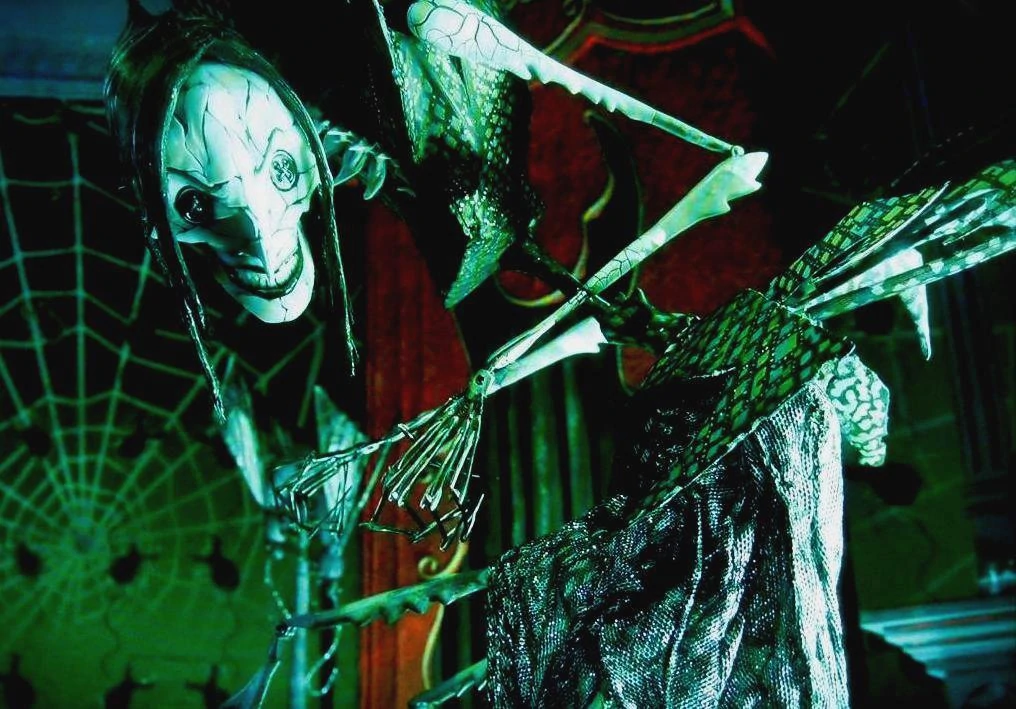
    For example, while I don’t think I’d pull from her directly, I love the way the Other Mother from Coraline is a long, spindly, sharp creature. She’s got some insectoid influence and she definitely borrows a lot from arachnids, but I’m more interested in the Uncanny Valley ways that she’s not quite like a human — proportions are off, movement is strange, too many joints, etc. It also makes me think of marionettes, those two concepts collided in my mind to make a sort of splinter-stick-monster-thing that does (uh, insert X thing, I haven’t quite nailed that down yet) to take control of people and puppet them.

    The Other Mother from Coraline, with inhumanly long insectoid arms & legs, hands made of needles, cracked-pottery skin and buttons for eyes. She is leaning menacingly towards the camera.
    The Other Mother, aka the Beldam, from Coraline. Thanks, I hate it!

    I have the expansion book Monster of the Week: Tome of Mysteries, which has helped me a lot in that I feel more free to sort of “go weird” with it. Tome of Mysteries is a collection of adventures that other people have written. They’re all unique, and several of them are bizarre (I can’t wait to run the one where the spirits of Elvis, Nixon, and the Killer Rabbit from Monty Python and the Holy Grail all come to life and destroy a local bar).

    My first couple of sessions I used draugr and vampires as the monsters, and while vampires will probably be making a comeback, it didn’t feel like I was doing anything particularly funky and unique with either of them. Tome of Mysteries has helped spark some more creative ideas, and ways to twist ideas I already had to make them more fun for me. I never would have started thinking about that splinter-spider-person without TOM.

    (Note: Tome of Mysteries also introduced an alternative to the traditional monster, called “phenomena,” that’s used for mysteries centering on some weird supernatural force. Imagine that instead of your players trying to find and fight a demon, they’re trying to find and seal a hellmouth. I’m poking the idea of an extradimensional haunted house for this one.)

    The Minions, Locations & Bystanders

    Minions, locations and bystanders are all pretty much what they sound like — minions are any person or creature allied with the monster, locations are places that will be important to finding important characters/clues/the monster, and bystanders are all the other people who are relevant to the adventure.

    Monster of the Week has a system where there’s lists of Types and Motivations for minions, bystanders and locations (and monsters too, actually). For example, a minion might be a Scout (motivation: to stalk, watch and report); a bystander might be a Gossip (motivation: to spread rumors); and a location might be a Maze (motivation: to confuse and separate). Note that these don’t have to be interpreted literally, they’re just meant to be archetypes. They give the Keeper a baseline to return to if they’re ever off-balance — what behavior would this NPC default to, or what kinds of events should happen in this place?

    I will confess, this is my current least favorite part of creating an adventure. I actually wrote the entire rest of the post and saved this for last because I couldn’t figure out what to say about it. I have a lot of difficulty conceptualizing how to keep the types distinct — some of their motivations feel similar to me, and I also often find myself sliding between types in the moment. Things changing during play is totally normal, of course, but it makes it really frustrating to plan ahead since it means I can’t get a clear picture of what I’m going to do.

    This is also the part where you’re most likely to run into the classic problem: players trying to go to a place or talk to a person you didn’t plan for. MOTW recommends having a couple of fairly setting-agnostic name/type/short descriptions on hand that you can drop in at a moment’s notice to deal with this. But because I have a tough time keeping things separate and clear even when I know what role a place or NPC is meant to play in the mystery, “just have a flexible one on hand that can be adapted to fit the immediate need” is my nightmare scenario.

    I don’t have good advice for this part. I don’t have a good fix. I have a couple ideas I want to experiment with in 2023, but for now, this is all I got.

    The Countdown

    MOTW, like all PBTA games, uses countdowns to organize the plot of a session. In Monster of the Week, the six-part countdown goes from Day through Midnight, which is more metaphorical than literal. Not everything has to happen in the course of one day; rather, Day is when the monster makes its very first move, and Midnight is the darkest hour, the moment when the monster wins and unleashes havoc on the world.

    The idea is not that this is the plot of the mystery, where the players experience each phase and do their best to counteract it, then dramatically overcome things when the clock reaches midnight. Instead it’s what would happen if the players never showed up at all.

    This means that it gets scrapped really, really fast in my experience. The countdown is useful for thinking through a monster’s goals and what their effect is on the world around them, but once players get to town, chaos tends to hit. Both from an in-game perspective (time to save the day!) and an external one (wait, what do you mean you want to go look for a location I never prepped?)

    In the future I want to figure out ways to design more flexible countdowns, so that I can aim for certain beats without railroading. But we’ll see how that goes.

    Session Structure

    I also wanted to talk a little bit about how I typically structure a mystery from a gameplay perspective, because I’m not doing it quite to the book. This is outside of the countdown, which is structuring the overall story. Here I’m talking about phases of play.

    Downtime

    We usually start a mystery with some improvised downtime. What has everybody been doing since they wrapped up the last mystery? Was there anything they wanted to do or check out, or anyone they wanted to talk to? Are there non-mystery related things that just seem like they’d be fun character beats?

    This time is pretty abstracted improv, and the players don’t have to roleplay actual dialogue if they want. It’s also not exclusively back and forth between them and me — they’re encouraged to what-if and suggest things to other people even if they’re not directly involved in whatever actual activity is being described.

    We only do this at the start of a mystery, which bears repeating because often one of our mysteries will go across multiple sessions (this is not how you’re supposed to do it, more on that later). Usually we spend about 20-30 minutes on this, which I think is probably too much time; in the future I want to shoot for 15-20, or even 10-15. The main problem is that goofing off with your friends tends to take up way more time than you expect.

    I’ve had a player say he appreciates the downtime phase because he’s not very comfortable with direct roleplay, but he wants that time to figure out who people are some more. (His character once went to Bigfoot’s poetry reading on his day off.)

    Note: This is not part of Monster of the Week. Not normally, anyway. I find it useful because it serves as a little bit of warmup time for everyone to get back into their groove, which is good because we often go with big gaps between sessions. But it’s a pretty silly and informal time, which I’ve been worrying about lately — MOTW is meant to be horror, so I want to make sure I’m not breaking tension before it’s even built.

    (MOTW has cold opens, which are scenes exclusively narrated by the Keeper of something monstrous happening far away. Think “hiker gets attacked by an unseen beast as they hike under the full moon, cut to the theme song & credits, cut to the main character doing whatever it is they’re doing as they start the episode.” I always forget to do these.) (Though now that I think about it, I could experiment with doing that before downtime and see how it works out.)

    Getting the Job

    I list this as its own phase, but it probably shouldn’t be. The real problem is just that I often take too long figuring out how the players discover whatever it is they’re supposed to be doing. Like, half an hour. We only play for four hours at a time. It’s too much! In 2023 I want to cut back.

    The Actual Mystery

    Then we play out the mystery, starting based on the job and the countdown and improvising as we go. I don’t know what to tell you.

    Really, what to say is that MOTW encourages splitting the party, both so they can investigate more clues and to build that spooky tension, and it really does work. The game is designed for two to three player characters, so splitting people up means they’re pretty vulnerable and it’s easy to rotate focus so no one’s ever left sitting for too long.

    I actually have four players, who usually split into either two teams of two or one team of three and one team of that one guy who runs off into the darkness yelling, “I’ll check it out, guys!” This means I need to try harder to make sure I’m not spending too long with any one group, but so far I don’t feel I’ve had too much trouble with it.

    I’m not sure what else I’d describe, except to say that MOTW has no formal way of structuring combat. If your experience is primarily with games that build in specific rules for how combat works, you’re going to have to rewire your brain a bit. For example, in D&D and Shadowrun, everyone including the DM would roll initiative and then each take turns doing something (in D&D, everyone gets one turn in the rotation; in Shadowrun, there are lots of special extra rules that govern the rotation, because people have the chance to go more than once if they roll well. Shadowrun is insane and I love it). Meanwhile MOTW kind of waves its hands and says “Eh, do what feels right in the moment. Don’t worry about taking turns!”

    That’s nice, and it’s probably something that works well with two or even three people, but it’s totally untenable with four. Instead we structure things as first-to-act, where whoever says what they want to do first, goes first. Next person jumps in, and so on, and once everybody’s gone, the rotation order is fixed. Note that the Keeper never features in the turn order — like I said, their role is to be reactive, so they enforce consequences whenever someone makes a move.

    Plans for 2023

    For all that I’ve described my process, I actually didn’t play a ton of MOTW in 2022. We started it as a pickup game for weekends where Shadowrun had to be cancelled due to scheduling conflicts, so it was already inconsistent; add the fact that, if Shadowrun was cancelled because I or one of the other MOTW players couldn’t make it, MOTW wasn’t happening either; then add traveling for holidays, vacations, visiting family, regular old cancellations; then add trying to keep my weekly activities (I have a lot) from getting overwhelming, and…

    You get the picture.

    In the end, we only played five sessions of MOTW, sometimes spread out over months. These gaps caused another problem: breaking up the adventures.

    In Monster of the Week, each mystery is meant to take one session. This is emulating the idea of Buffy, Supernatural and The X-Files, where two-parters (or, god forbid, three-parters) are reserved for The Big Stuff, so they can have maximum impact. I’m not great at brevity, and we have never finished a mystery in one session. It’s always two. So, putting that together: in all of 2022, we solved two and a half mysteries.

    So yeah, there’s some stuff I want to improve on. Broad strokes:

    • Keeping mysteries to one session – this’ll mean that large gaps in between sessions are less impactful, because we won’t have a mystery interrupted.
      • For this – I think scheduling slightly longer sessions would be a good start, and trying to keep our downtime/mystery set-up short (I have a habit of spinning this a little too long).
      • I also want to find time for something in Monster of the Week that I totally forgot about until reviewing the books recently: the cold open. The idea is that it’s a mini scene that none of the players are in — something remote and far away, the first attack by the monster, that sets the tone for the mystery. Pre-mystery downtime is often a more fun and silly time, so I hope this would make it easier to switch tones. Of course, this means adding more things rather than paring down…
    • Figuring out the overarching plot – MOTW is meant to be one-offs, but all good monster of the week shows have season-long arcs tying things together. Right now I’ve planted a whole bunch of seeds and have no idea which ones to tend; I’m juggling more than the recommended number of characters and want to make sure they all have something interesting to do.
      • For this – Keeping mysteries to one session may actually help with this, because it means we’ll be able to explore more things and figure out what we want to focus on. Players have a lot of influence (like, a lot of influence) on the larger narrative even when they don’t know it, so getting to experiment and see where things go should help with this.
    • Pushing the horror, pushing the mystery, & challenging my players – In D&D, the fantasy of the game is that you’re an epic hero, undaunted by injuries. You play totally unaffected by your wounds, right up until you pass out, and then you get up again. Monster of the Week has rules about the consequences of getting hurt, but D&D has primed me such that I often forget about those rules. I want to find a way to have fights be scarier, so that they’re incentivized away from just hitting every obstacle until it falls down.
      • For this – I’ll need to sit down with my players and talk to them, because if I start using the MOTW rules for consequences, the game is going to get a lot harder for them very fast. Then, I need to actually keep a copy of those rules on hand to reference regularly. (Official quick-reference sheets do exist, and they’re linked below… I just always forget to check them.)
      • I also need to get better at how I say “yes”. Monster of the Week gives a ton of power to player characters; they have lots of ways to affect the narrative, and it goes against my instincts not to “yes, and” a bit. But I know there are times when a player has said, “Can I do [this thing that is maybe technically possible with a very generous interpretation of the rules, but that should be really difficult]?” and I’ve said, “Yeah, sure!” when I should have said, “It’ll cost you.” This comes back to including consequences: I don’t need to say “no”, but I think it would be good to make things harder for players, so they think more carefully about what they’re willing to risk.
    • Meeting more often – I’ll be honest, I need to sit down and think about how I’m gonna do this one. I really, really worry about adding another frequently-recurring activity to my schedule — I currently have something Monday, Tuesday, Friday and Saturday evenings, and stuff going on Saturday and Sunday afternoon as well, with occasional Wednesday activities too. One of my New Year’s goals is to pare down so I don’t get overstressed, which isn’t exactly compatible with a regularly scheduled game.
    • Getting comfy with minions/locations/bystanders – I covered my problems here pretty thoroughly in the section before, so I’m not going to rehash it here. I have a couple of ideas for getting in some practice and making them feel distinctive and clear, but that might end up being its own post.

    Monster of the Week Resources

    Okay, so there’s no substitute for the books. There just isn’t. Monster of the Week has character options, detailed rules, advice on how to build adventures, and a couple of sample mysteries so you can get a feel for what’s going on; Tome of Mysteries is 25% new rules/characters options/monster options, 25% essays and advice on horror/adventure building/running TTRPGs in general, and 50% pre-written adventures that you can run yourself, all of which are really good and a lot of which I have flagged with post-its so I can flip to them very quickly.

    The things I’m about to link are free PDFs offered on the official website, so you know they’re legit. They’re bare-bones reference sheets for basic character & Keeper touchstones, things you’ll want to check often and at a glance, so I’m sharing them for people who want to get a feel for the kind of tone MOTW has. If you’re interested, go check out the books for further info. (There’s a new book soon! I don’t know how soon, but according to their project development page, hopefully some time in 2023.)

    I never know how to end posts, so I’ll just end it here. Maybe next time I build an mystery, I’ll blog that process. Anyway, #NotSponsored, I just like this game.

css.php