Category: Project Planning

  • Making Zines for Reclaim Open 2025

    When I was invited to be a part of Reclaim Open 2025, I decided I would use the opportunity as a challenge to do something I’d been mulling over for a long time: creating a zine.

    I tried my hand at zine making while I was at Reclaim, for a project that unfortunately had to be put on the backburner. Since then, I’ve been curious about revisiting it, and seeing what would be possible. I’ve had a couple of ideas bouncing around. This seemed like a good time to try.

    The challenge I set for myself was to make two open-source zines, print-ready, and blog about it in time for the conference. And, well, here’s the writeup!

    Results

    CTRL+S: Preserving Your Work for the Long Haul is a short primer on planning resilient digital projects and preserving and archiving them, so that when the time comes for them to be sunsetted, it’s easy for you to preserve their core attributes and archive them as best as possible.

    Web-Native Cryptids & Creatures: A Spotter’s Guide is a little trifold fun-facts style starter guide to various web safety and digital literacy topics, in the style of an Audubon birdwatcher’s pamphlet.

    Both of them are available as a for-print PDF and a more web-readable PDF (no need to download if you don’t want, you should be able to click through and view online). I’m not going to embed them here so that this post doesn’t become unreadably long.

    Process

    Before I started, I had the idea that I would actually try and make three zines. Then I sat down, tried to think of concepts, and blocked out a project plan for each zine. And then I changed my mind. Two would be plenty, actually.

    Of the concepts I picked, I went with one serious one and one fun one. CTRL+S is based on work I did at both Carleton College and Reclaim Hosting, on how to create and preserve resilient digital projects. Web Native Cryptids & Creatures is based on the fact that when I was little I had a trifold birdwatcher pamphlet that was basically the coolest thing ever.

    Naturally, the fun zine turned out to be a lot more stressful than the serious one.

    Planning

    The first thing I did was to decide on the structure. That would inform any outlining and writing, so even if I wasn’t actually doing layout right away, planning it still had to come first.

    I wanted each zine to fit on a double-sided sheet of printer paper. The cryptid zine was going to be a trifold “spotter’s guide” style thing, so it could have six pages (three front, three back). There was no particular style in mind for the preservation zine, so I decided to go with eight pages (four front, four back). I figured if I had to divide each topic onto its own page, sixteen was way too many and four might not be enough.

    The thing with laying stuff out for print is that stuff ends up in a weird order, upside-down, or both. I have several index cards that I folded and numbered in order to figure out what layout would end up having to look like.
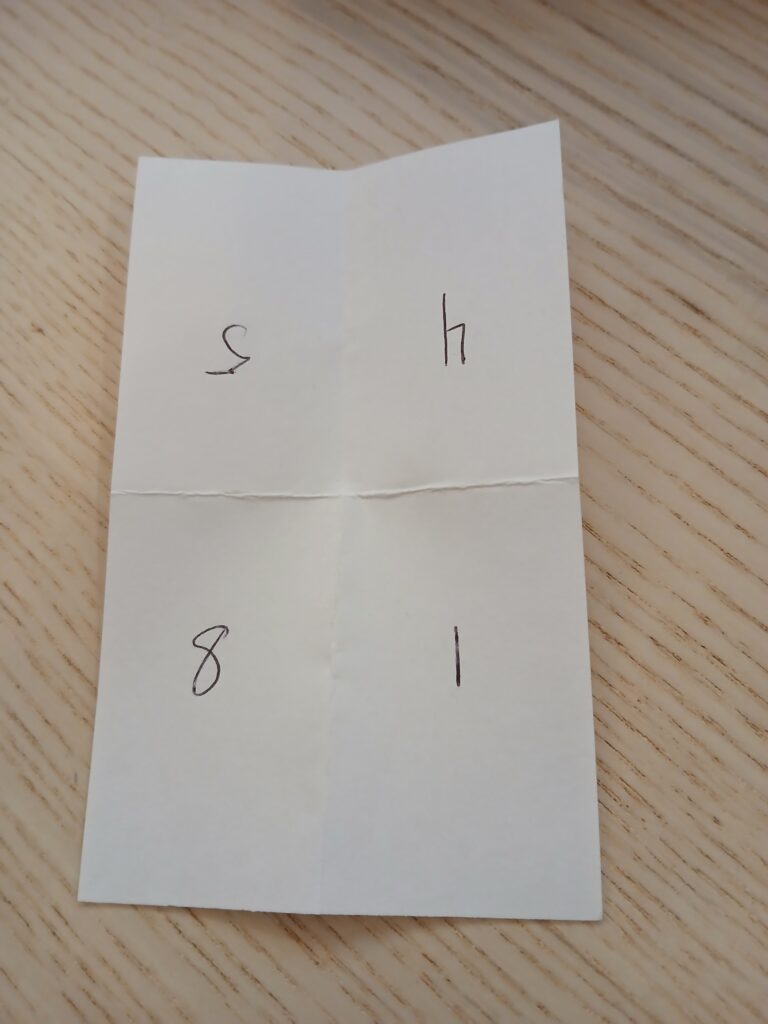
    Photo of an index card that's been folded in half twice, to create four sections. In clockwise order, the numbers are 5, 4, 1, and 8. 5 and 4 are upside down.

    Drafting

    When in doubt, start with outlines.

    Since the preservation zine was based on work I’d already done, I reviewed the original handout, identified the two main topics, and made a list of other topics that I’d learned more about since then. There was nothing that strictly followed anything else, but I organized it into an order that seemed like it would flow well for people new to the topic, and then started making bullet points.

    The cryptid zine was meant to be a silly piece. I only needed five actual profiles, since one page would be for the title/credits, so I made a list of monster puns and then tried to narrow it down to the most plausible. But the actual writing was a balancing challenge: how do I make sure this is at least semi-useful… while also keeping it fun… and not too long… and also, what even is this strange thing called “humor”?

    It turns out that writing about topics you’ve presented on countless times is significantly simpler than trying to be funny on purpose. Go figure.

    Layout

    Layout was my shining star amidst the trenches of writing. I spent more time doing it than I expected, but that’s because it felt like such a breeze that I would look at the clock and be surprised by how quickly the time had passed.

    I had a genuinely great time playing with where the words would go, and how big, and what font, and what size margins. The slowest it ever got was when I spent an hour or two trying to manually set up a guideline grid that would match the cryptid zine’s trifold structure. Then I googled “affinity publisher column layout” and figured it out immediately.

    This also served as an extra editing pass. Moving the words into Affinity Publisher meant looking for ways to trim the bits that were too long, and rearrange anything that didn’t make sense.

    Illustration

    I checked my notes from while I was doing illustrating and all I found was screaming. The illustrations were all for the cryptid zine, and they were part of what was so stressful about it. I used to draw more, but I’m very rusty, and the first day I tried it was dispiriting. All my ideas seemed terrible, and nothing I drew looked at all like I wanted it to.

    I hit a point where I was just relieved that the preservation zine didn’t have space for illustrations, because the cryptid zine was freaking me out so much. It didn’t help that I hadn’t thought about the time I would need to draw, so it was getting very close to the deadline I had set for myself.

    In the end I took a step back. I came back the next day, did some extra warm ups, found more reference images, and went, “This is the fun zine. What matters is that illustrating it is also fun.” I could be silly with it, I told myself.

    And then I drew the Loch Ness Monster in sunglasses and a trenchcoat and had a great time.

    Reflections

    I’m glad I did this. For all my grumping, I had a great time with this project. Every time I hit a point of frustration, I would pause, take a break, come back, and almost immediately get in a groove. Giving myself two zines to switch between also helped a lot — when I was well and truly stuck on one, there was always something to do on the other, so I could just change gears.

    There’s a bunch of stuff I was hoping to have done in time for the conference that, in the end, I don’t. I wanted to put together web-page versions and get them archived on the WayBack Machine, and I’m going to do that. I wanted to try interviewing other zine makers and blog about those conversations, and I didn’t get to it. But the goal for the conference was to have two print-ready PDFs, and I did manage that.

    So if you’re thinking about making a zine, let this be your sign!

    And these zines are openly-licensed, so if they’re helpful to you, please go ahead and use them! I’d love to hear about it if you do.

  • Drafting a Scope of Work

    This past week I had cause to make a scope of work for a client from scratch, which is something I don’t get to do very often. I figured I could blog the process just to document it, though I’m not going to share any examples from the actual SOW I made — just outlines.

    I actually had a scope of work that I’d made back in 2022 (!) available in Google Drive, which I only remembered existed by coincidence. But it was a nice find, because it meant that I could reuse all of the formatting work I’d done previously, even if all the content had to be jettisoned. I could also build off the structure of the old one/scrap or add parts as needed.

    The overall structure was:

    • Title
    • Contextual information
      • the client’s institution
      • the name & title of the person I’m preparing it for
      • my name & title
      • the date
    • Overview (context section that goes sort of broadest to narrowest on detail – the name of the product/service and what the client’s needs are, then info on the product/service and how it will meet those needs)
    • Work Breakdown (specific steps that will happen in order to provide the product/service – both what we’re responsible for & what the client will need to do)
      • If I need to give a specific explanation of why a step has to happen a certain way, I’ll do it here, but I try to keep it short
      • Mode of delivery, if there’s specific deliverables
      • Hours required for a service, if a certain step needs it
      • This bit got split into multiple sections for the SOW I made, because there were multiple things the client wanted & each one had different things that needed to happen
    • Costs Breakdown (a table of costs with the following columns):
      • Unit type
      • # of units
      • Item/description
      • Unit price
      • Total item price

    In other SOWs I could probably include a specific work timeline or relevant history between Reclaim and the client, or other information if it’s needed, but it wasn’t for this.

    The other important thing was a sanity check. I ran this by Taylor, Amanda and Jim, and they noticed some big changes that needed making (Taylor in particular found a point where I was seriously overcomplicating things!)

    I found the process pretty fun! Drafting this kind of thing from scratch doesn’t come up all that much, but somehow it feels like helping to create something totally new, which is just plain cool.

  • The Finger-painting Approach

    In the midst of learning about containers and PHP (no blogging on that yet) and daydreaming about how to put together my own PHP/JavaScript site/application/what-have-you that’s a tool exactly tailored to what I need, I decided to go back to basics: HTML, CSS, and nothing else.

    I’ve messed around with HTML and CSS before, but it will have been almost three years, in, I don’t know, February? Maybe less. CSS in particular is a terrible horrible minefield, so I wanted to know more about how that works. I messed around with JavaScript some about a year ago, and before that in May or June of 2018, but I remember almost none of it.

    So I built a monster.

    Seriously, go take a look. It’s right here at pilotirwin.com/hideouscreation/. It’s so ugly. I love it.

    There’s a lot of freedom in letting yourself be absolutely terrible at something. I love following tutorials, it’s probably 95% or more of what I blog about, but a tutorial is designed to walk you through carefully designed steps so you can get to a polished, or at least decent-ish, final product. But I think there’s something to be said for the finger-painting approach, where you take amateurish, basic knowledge, and make something terrible, and delight in all your mistakes. And I know I’m not alone in this, but making this nonsense has really reminded me of it.

    Everything about the page is ridiculous. It’s blatantly stream-of-consciousness, written as sort-of notes to myself even as I was writing. It’s documenting my process without actually really explaining the steps I’m taking (just “Hm, I wonder how you make THIS page element” followed by a page element that isn’t really anything), which means that if you want to figure out what was going on at any given time, you’ll probably have to back-engineer from context.

    And I’m really happy with it! It was quick and experimental, which is something I struggle with — as I said, I love tutorials, but I always want to sit down and carve out hours at a time, which is very hard for me. This was done sporadically across yesterday and today, and giving myself the freedom to be bad meant that I could be speedy, since I didn’t have to follow along with anything. It was all “Oh, that could be interesting…” followed by either “I think this is how I remember doing that?” or a two-minute search for exactly what I needed.

    I’m even going to let this blog post be short and silly and amateurish! I’ve churned this out in maybe fifteen to twenty minutes because I want to publish it before I go to lunch and I’m very hungry, so no tags or categories here, goodbye and have a nice day.

  • Goals for Gravity Forms

    For the month of June, I’m participating in Reclaim’s Gravity Forms flex course, where we’re learning about the tool Gravity Forms and how to use it to accomplish great things. So I’m recording some of my plans in the hopes of laying them out a little more clearly for myself. If I know what I want to do, that’s a pretty big step in being able to do it.

    I’ve thought idly about the idea of an audio drama database for years. Quick terminology: audio dramas are fiction podcasts, usually with multiple actors but not always, and they’re getting more and more popular. I used to be quite ahead of the curve, but now– well, a bit less so.

    By database I’m thinking an entry for each show, which can be submitted via the form, covering:

    • Title
    • Network
    • Website
    • RSS feed
    • Quick descriptor tags (sci-fi, fantasy, small cast, single narrator, comedy, drama, etc.)
    • Summary
    • Cast (?)
    • Crew (?)
    • … and maybe some other things I haven’t thought of

    Cast and crew are maybes mostly because I’m not sure how to format and standardize them yet, and they have the potential to seriously bloat an entry. Maybe something along the lines of a text box for name, dropdown description of role (“Writer”, “Director”, “Producer”, “Sound Designer”, “Actor”, etc.)… and then citation-inspired formatting. Who knows.

    This is also likely a first draft; if I were ever to iterate on it, it would probably be a good idea to get feedback from the actual audio drama community on what information they think would be relevant (I could collect it using a Gravity Form!).

    Ideally I’d like to be able to search and filter based on multiple tags (so people could narrow down a search to something along the lines of “sci fi + single narrator + drama” and get a recommendation for exactly what they’re looking for), but that’s probably a different plugin, and probably not something I have the capacity to write myself… maybe. Who knows? Maybe writing WordPress plugins is my next project after this.

    I’ve toyed with the idea of having an additional form that people can use to submit reviews, and then maybe have a way to append them to the entry Comments is probably the simplest way to go about that, but I’m on the fence. Are reviews something that would have a place in a database like this? Is it not enough to collect information in a centralized place?

    And the last question is — how to verify this information, and OK it with the crew of the show? Preventing spam is always a concern, as is preventing just straight-up fiction. But that’s a question for the future. For now, I’ll need to get building.

  • Reclaim Cloud & Troubleshooting Dates

    I actually did this work on Friday, but I didn’t have the opportunity to write it up – just took a couple of notes so I could put this out today.

    As of Friday, I’ve figured out, at least for now, how I want to store and retrieve dates. When I retrieve dates, I want them to be reverse chronological, so the most recent date can be accessed easily. For now, that means that my retrieval function reads the CSV where the dates are stored into a list, then reverses the list & returns it. Whatever asked for the dates to be retrieved receives a list in reverse chronological order. (My write function appends the date to the CSV, simple enough.)

    During the initial working-out-the-kinks phase, the retrieval function actually iterated over the reversed list, printing off the dates rather than returning them. But after that caused some issues with redundancy, that got revised to returning a list.

    I also ended up setting up a helper function for the printing which essentially iterates over the list, appends each item to a string with a new line at the end (so, 2022-12-17 \n), and returns that very long string (which gets longer with every update), which can then be printed by whatever requested the dates. This is super inelegant, obviously, so a priority is going to be to figure out a nicer way of handling this.

    Another priority is going to be just… figuring out how to denote updates that happen on the same date. Every time I run the program to test it, it’s counted as a separate update and logged to the CSV. This is good! This is what I want! But I ran this program twenty-three times on Friday, so now the datelog reads (reverse chronologically):

    2022-12-17
    2022-12-17
    2022-12-17
    2022-12-17
    2022-12-17
    ...

    … and so on. You see the issue.

    I put together some questions to ask myself about how to solve this. Still haven’t answered them yet, but essentially they consist of: how do I denote the number of updates on a particular day? How do I store that information as separate from the date, and access it easily to update it?

    One way, which sounds very clunky to me, would be to store the date alongside a number of updates (so, 2022-12-17 for the first update, and then edit that to 2022-12-17 (2) for the second update, and so on. The formatting is still under consideration). The second way, which is even worse, is to store the information as above (every date listed neatly for every time updated, which will get super long very fast), and then every time I would need to return or display a list of previous dates, iterate over the information so that I can return it in a nicer format. No, thank you.

    I think the next step might be MySQL, which means that I’ll have to (re-learn) SQL and how to use it in Python. I’ll also have to pick a database, which will probably be MariaDB, mostly because I picked it randomly from the available MySQL databases when I was setting up the Reclaim Cloud environment which I’m hoping to test this on.

    Oh, right, I have some Reclaim Cloud environments now. The environment for this project isn’t currently online and won’t be for the foreseeable future, unless it turns out I absolutely require the MariaDB from Reclaim Cloud to store the information. Which I probably will.

    For the other environment, I’ve also been poking around a little bit with Ghost — not much yet, as I’m still working on getting it updated to the newest edition from 4.5.0, which is what I’m currently on. Once I do, I’ll be experimenting with the blogging features, as Reclaim is considering using it for our newsletter, which start being released at the end of January 2022. That environment is also offline for now until I figure out what I’m missing trying to update from the command line. Currently I’m dealing with this error:

    A very frustrating error.

    What that sums up to is mostly “You need to update using Ghost-CLI, but you can’t, because you didn’t install this using Ghost-CLI” (I used a one-click installer). Once I get the answer I’ll be able to write this up better, maybe as an article for our support docs, but in the meantime: still working on it.

  • Logging Stats Across Sessions

    So it’s been a while since I’ve made a blog post, but I’ve been working on my wordcounter/writing tracker app, and what I’ve been tooling around with recently is the question: how do I track information across sessions? By which I mean, if I run the program in Terminal once, how do I make sure that whatever information I log that time is still there the next time I run the program?

    The answer on its face has been pretty simple: read and write to a CSV file. I haven’t done this in a long time, so I had to look up the methods and practice them a little bit (documentation here), but given that they have examples in the documentation, that part wasn’t so difficult. The problem was the questions this raised, which I don’t really have answers for right now.

    • When I add an update and check whether the update’s date is the same as the most recent update (ie, have I already added an update today?) do I want to:
      • log the date every time (so for three updates on the same day, 12-14-2021, 12-14-2021, 12-14-2021)?
      • log the date and the number of times that day I’ve updated (12-14-2021, 3 updates)?
      • not reflect the number of updates in a day at all (12-14-2021, no further information)?
      • (If I choose option 1, how do I efficiently turn that information into something meaningful for the user? If I choose option #2, how do I store that information neatly?)
    • Where/how do I save my writing streak and my total words counted?
      • If I save the information in my date log CSV, how do I keep this information from getting messy?
      • If I save the information in separate CSVs, how do I preserve relationships between the data?
    • How do I efficiently log and retrieve my data?
      • Do I try to record dates in reverse chronological order, most recent first (aka not what these functions are designed to do)? If so, how do I retrieve only the first row?
      • If I go with the flow and record dates in chronological order, appending the newest date to the bottom, is it possible to retrieve only the most recent row, or do I have to read through the entire file?

    I’m pretty sure the answers to at least some of these questions can be solved with some careful Googling, but I’m a little worried that one or more of them may be “Go learn SQL, you doof”. Which is definitely possible. It’s just a pain.

    And eventually, the looming/haunting question: how am I supposed to turn this into a web app? But that’s way too big to tackle for now, so we’ll build that bridge when we get to it.

    [Super secret end-of-post sidebar: should I have a Git repository that I push to? Should I be pushing alongside every blog post? Would that be elegant/thoughtful/informative? So many questions today.]

  • Refactoring & Rewriting

    So in the past couple of days I’ve been making a lot of… I suppose I’d call them tweaks, because nothing feels big enough to consider it a major change. Could I even make major changes in a two day timespan without just hunkering down and doing nothing else? Probably not.

    So what have I been doing? Mostly refactoring, honestly. Initially I had a couple of methods for updating the wordcount, checking whether to update the day, etc., but I was running a lot of them in multiple lines the __main__ function rather than calling a single clean method. So I wrote a method, getUpdate(), and then subsequently retooled that method to make it more versatile.

    Before getUpdate() would ask you for how many words you’d added to your total, then staple those on to whatever your current total was already (right now it’s always 0, because the program doesn’t retain information between sessions). Now the method will ask you whether you want to add words or give your new total (so, stapling words onto the preexisting total, or replacing that preexisting number entirely); then it calls one of two helper methods based on that, in order to do what you want.

    Those helper methods also ended up having me refactor and split off more helper methods, which has honestly been a good exercise in thinking through what each line is doing and where it might end up getting reused.

    The other biggest “change” has mostly been clearing up my comments, which refactoring has also helped with. Python doesn’t render multi-line comments natively, so the convention is to enclose them in “””s (triple quotation marks), which causes it to register as a multi line string that the computer will just sort of ignore when it comes time to parse. I’ve been using my pre-method comments both as a place to describe what a method is supposed to do — this is good practice — and a place to keep notes about questions/concerns/functionality I might add (this is messy practice). But hey, this project is only for me, right?

    Well, a different problem arose, and it feels a little superficial. My text editor, Atom, color-codes everything in order to help with readability, and it renders all of Python’s strings in a bright green. This works great to offset strings from other things, but when I have lines and lines and lines of green, it makes it hard to see anything else, because it draws the eye so much. Refactoring and tweaking has been as much a way for me to strip down my notes to a point where I can use one or two single-line comments and get rid of the green, as it is to improve my code.

    The next big questions (that I’m scared to answer) will probably be: how do I store information between sessions? And how do I test multi-day streaks? The multi-day streaks will have to come after the storing-between-sessions question, just on account of I can’t have multi-day updates if I can’t store between sessions, but once I’ve got that… hopefully more things will start falling into place.

    More potential avenues for the future, non-immediate: can I/should I practice test driven development with this (might be a bit close to my Model/View/Controller thoughts from last time, haha)? How do I integrate a Python app with Javascript (am I going to need to figure out Flask, which I don’t even know what that is)? Is it possible that I’ll have to “finish” the program, then rewrite it in Java to make it compatible (eek, but I sort of miss Java’s structure compared to Python’s spaghetti-noodle flexibility)? How do cookies work? Should I take a day to just work on building really basic HTML sites with interactive fields and buttons (yes)?

    And, just for the sake of long-term organization and consistency, I should probably a) make a more structured planning document and b) get a GitHub where I can keep better records of what I’ve been doing day-to-day.

  • Messing Around with Python

    In my ongoing saga of “How do I build a web app?” I decided that a good first start would be to build just a regular program that does the things I’d ideally like my first web app to do. In this case, in the spirit of National Novel Writing Month, I’ve been thinking about what’s needed to make a wordcounter/streak tracker/maybe some other things. You know, a cohesive idea like that.

    The wordcounter and streak tracker will probably be fairly easy to implement just on my machine, as it’s pretty much all numbers, so I’m starting there (famous last words?). I’ve actually already started with them. Once I’m happy with them, I’ll try setting them up to work as a really basic, no-styling web app locally, and then we’ll take a crack at deploying using Docker. Probably still without styling, because the longer I can put off untangling the horrible spaghetti that is CSS, the better.

    Why Python? Some pretty superficial reasons, honestly:

    1. I have prior experience in it, though not for a while;
    2. I own a textbook that’s designed to teach you programming using the Python language, which should be useful considering it’s been a while since I’ve really made any significant projects;
    3. and I don’t have to install any new languages on my computer to make it work.

    I considered Java, which fulfills condition 1 and makes up for condition 2 by having JavaDocs (JavaDocs is a work of art), but which doesn’t fulfill condition 3; then I considered Ruby, which is something that I’ve wanted to become proficient in for a while, but which doesn’t actually fulfill any of those conditions. Sad face. Better, I think, not to try to learn two things at once if I don’t have to (especially when I’ll need one to learn the other).

    So far I’ve only implemented three methods: one for getting an updated wordcount & changing the total, one for setting the most recent day updated if needed, and one for checking whether the most recent update requires the most recent day to also be updated. (That’s a lot of recents and updates – I may need to adopt better terminology.) There’s also a main function for getting input through the command line & using it to update the words total & most recent day.

    Plans for the future:

    • methods for tracking the total number of days a person has updated their wordcount
    • methods for tracking the number of days in a row a person has updated their wordcount
    • working out how to make this work with HTML/Javascript to create a local web app
    • Potentially: working out how to effectively backdate updates and integrate them into the streak; working out how to store all this w/ cookies on the user’s machine

    Questions for the future:

    • How/where am I going to store info in between sessions?
    • Can I implement this using the MVC model, or is that too much while I’m getting back in the swing of things? (Potentially I could do the whole thing, then refactor all of it into MVC, but that sounds like a huge pain.)
    • What even is the relationship between Python & Javascript for this stuff? It’s been a very long time since I used Javascript.
    • Probably more things that’ll come up soon!
  • Planning with Omeka S

    Over the course of the next month or so, we’ll be developing an Omeka S site to host translations of medieval documents — which means we need to know how Omeka S works. Today (and over the course of the next week or so) I’m taking a dive into Omeka S’s documentation in order to prep. The documentation is available here, in case you were curious.

    I won’t rehash it, because explaining a lot of the technical stuff will get boring fast, but the main takeaways of the beginning are much more geared towards questions of design and planning than specific fiddly technical bits. So that’s what I’ve been thinking about in the context of our project. They’re good questions to ask of any project, but I’m going to answer them here specifically for what we’re doing, because… yeah.

    Who is our audience? Primary, or secondary? Our primary audience will be historians who want to reference medieval documents; our secondary audience, if we decide to make this part of the project, might be translators looking to share their work. That’ll need to be another conversation.

    What do we want people to be able to do on our site? The site’s primary concept is as a searchable repository: we want people to be able to locate useful documents based on the metadata associated with them. That means we don’t need many pages of context, beyond perhaps a description of the project; the scholarship being done is in the presence of the content. The open-ended issue here relates to the first question: do we want translators to be able to share their work? That’s functionality we can add… but is it functionality we need?

    How are we thinking about what’s on our site? Omeka S operates using items, which have properties (metadata…ish?) associated with them; the items can be grouped into item sets, which also have properties. Items, item sets, and media can be used as properties for other items and item sets.

    This is probably the blurriest part right now. Each translation will almost definitely be its own item, but what will the core theme of each item set be – if we even have item sets? Will we end up making other features of the translations items, in order to create a better network through properties? (IE, if we have multiple translations from the same author, should we make the author also an item, so that we can navigate from the translation to the author to other translations?)

    This would be a question to answer before we get started, since it would inform everything about how we enter the data. It’s not a bad idea, but scope creep is… not something to take lightly, and we need to do some time estimations.

    Goals for planning, then:

    • Plan out our rough stages (given what we need the site to do, what do we build first? When/how do we add the translations, and how do we store them?)
    • Ballpark the amount of time each stage might take
    • Figure out who should be doing what, depending on the amount of time we have, what our deadlines are, and who’s busy when
    • And of course, keep reading the documentation
  • Code, Cactuses, and Kanban

    Not a whole lot to report today, just some floundering as I try and figure out my next steps. There’s two fronts I’ve been talking about, Agile and Unity, so I’ll cover them both.

    Agile

    Simply put: I don’t have a whole lot I can adapt for Agile in my current work. The projects I’m working on sort of suit it — Agile is about incremental deliverables which add functionality, which is a lot of what I’m currently doing in my documentation and policy work.

    But most of Agile’s (well, Scrum’s) tactics really boil down to ways to keep a team motivated, focused and cross-functional. Daily stand-ups? Planning poker games? Those are ways not just of managing information, but engagement.

    I did pick up the Kanban swim lane diagram practice, though. I have a Trello board. It’s very pretty (and it’s easy to keep notes on each card).

    Unity

    Unity today has been a lot about figuring out where I am. The most recent thing on my project chart has been working through a lot of the beginner projects — except I’ve already done most of the Kart build, and I’ve at least touched on the platformer and FPS microgames (this was back in August or early September, before I started writing things down). I didn’t want to work through a list of things I’d already done, or things which were almost the same as what I’d already done (modding out the platformer was mostly just about aesthetics, which we did a bit in the Kart game; modding the FPS game looks almost exactly the same, except that you have to purchase all the modding resources). 0/10, highly demotivating.

    After I’d finished the beginner projects (you know, the thing I didn’t do because I’d already done it), the plan was to plan an original project of my own, then create it. I… don’t think I’m ready for that yet, in part because I don’t know where I’d get assets that have behaviors and functions attached. Maybe I’d have to write my own.

    So instead, I started poking through the other tutorials Unity offers in the ‘Learn’ tab of Unity Hub. I came across one that looked particularly interesting, called “Creator Kit: Beginner Code“. It said it recommended working through one of the other Creator Kits first, so I noodled around with one called “Creator Kit: Puzzle” (I love puzzle games). But in the end, it looked pretty similar to the microgames, so I let that one go.

    This means it’s (sort of) settled: Beginner Code will be my next project. I’ll start working on learning C#, and hey, maybe I’ll even manage to go back to Codecademy for a little extra practice. I haven’t had the chance to dig into the actual tutorial yet beyond getting it just set up and imported, so there’s nothing to report on that front, but from what I’ve seen so far, it has cactuses in it. So, a win on all fronts.

css.php